Sorry your browser is not supported!

You are using an outdated browser that does not support modern web technologies, in order to use this site please update to a new browser.

Browsers supported include Chrome, FireFox, Safari, Opera, Internet Explorer 10+ or Microsoft Edge.

2D All the way! / Crisp Pixels

Author
Message
Turtle Soup
21
Years of Service
User Offline
Joined: 30th Jul 2004
Location: -.-
Posted: 15th Mar 2007 22:07
Im knew to 2D game making, never really used sprites before
Ive made a character
but theres something i cant get my head around...
the graphics arnt what you'd call..crisp
theyre all blurry and fuzzy
and generally dont look very good at all

does this happen to anyone else...is there a buffer that i dont know about?

could someone help?

if time travel was possible, it would have already happened
Zergei
21
Years of Service
User Offline
Joined: 9th Feb 2005
Location: Everywhere
Posted: 16th Mar 2007 05:18
When loading an image put at the end of the command another ",1" , like this "load image "file",1,1" . The last parameter represents the "Texture Flag", and setting it to 1 means no mipmapping, wich makes images look blurry.

Further on my stuff at...
zenassem
23
Years of Service
User Offline
Joined: 10th Mar 2003
Location: Long Island, NY
Posted: 13th Apr 2007 03:28
Also be sure that the images you are using/creating are in a lossless format. jpeg images use compression and destroy the integrity of the pixel art. If creating your own images be sure to only save it a lossless format like .bmp, .gif, .png etc...

be sure to save your work often, and double-check that it is saving it in the proper format. I've lost hours of work by finding out that somewhere along the way my program began saving as .jpeg.

For some real good tips about creating good pixel art check out this link.

So You Want To Be A Pixel Artist
indi
23
Years of Service
User Offline
Joined: 26th Aug 2002
Location: Earth, Brisbane, Australia
Posted: 13th Apr 2007 03:47
gif can be a lossy format as well mate.

Quote: "
GIF creates a table of up to 256 colors from a pool of 16 million. If the image has fewer than 256 colors, GIF can render the image exactly. When the image contains many colors, software that creates the GIF uses any of several algorithms to approximate the colors in the image with the limited palette of 256 colors available. Better algorithms search the image to find an optimum set of 256 colors. Sometimes GIF uses the nearest color to represent each pixel, and sometimes it uses "error diffusion" to adjust the color of nearby pixels to correct for the error in each pixel.

GIF achieves compression in two ways. First, it reduces the number of colors of color-rich images, thereby reducing the number of bits needed per pixel, as just described. Second, it replaces commonly occurring patterns (especially large areas of uniform color) with a short abbreviation: instead of storing "white, white, white, white, white," it stores "5 white."

Thus, GIF is "lossless" only for images with 256 colors or less. For a rich, true color image, GIF may "lose" 99.998% of the colors.
"


zenassem
23
Years of Service
User Offline
Joined: 10th Mar 2003
Location: Long Island, NY
Posted: 13th Apr 2007 05:47
Thanks Indi, for correcting my mistake.

To be honest, I was worried about including .gif & .png, but was a too lazy to look it up. GIF never gave me a problem because of the 256 color barrier, I assume.

Most of the great Pixel Art sprites out there do not actually use that many colors. The tutorial link I provided emphasizes that.

Can you guess how many colors are used?


In fact some of the most respected sprites from Capcom, SNK, and Square Enix, use less than 10 colors for a character. It's all in the technique. I've never had the need for more than a 256 color palette in any of my 2D projects. I tend not to use any type of automated gradient fills, or anti-alising.

I guess I'm Old School.
Phaelax
DBPro Master
23
Years of Service
User Offline
Joined: 16th Apr 2003
Location: Metropia
Posted: 14th Apr 2007 09:40
Try drawing sprites for the Amiga, I was limited to 16 colors for my game sprites!

zenassem
23
Years of Service
User Offline
Joined: 10th Mar 2003
Location: Long Island, NY
Posted: 15th Apr 2007 23:43 Edited at: 15th Apr 2007 23:46
@Phaelax,

16 colors was a big breakthrough. I started on the Atari 800xl , which was even more difficult to get colors out of than the beloved Commodore 64. Although it Atari always seemed to find ways to fudge the number of colors avail on the screen at once, it was a real chore.

Each specific graphic mode was different, but truly basic only gave access to 4 color registers. Each could be assigned an even # from 0-16 hue, and contrast/brightness.

eg. Setcolor [color register + 1], [hue (0-16)pos ints only], [brightness (0-16) pos ints only].

Even more troublesome was the fact that the registers were tied to other colors like the border, textcolor, background, text background.

If things weren't complicated enough... acesss to sprites (Player/missiles) were only availiable through machine language calls (USR$) to memory locations. Usually you had to combine Players and Missiles together to create 1 hardware sprite.

The real kicker. Player/Missile graphics were accelerated to move in a vertically on the screen. Getting them to move horizontally brought with it a ton of headaches, Especially on detecting collisions or if one Player/Missile crossed over another Player/missile.

Even if you got around all of this. Basic was too slow to create arcade animation. Truly the only way to get even the simplest arcade like game, was to do everything via assembly. Even this required accessing hidden graphic modes and combining screens, and utilizing excess keyboard character space to create software sprites. So if there was a letter or graphic on the keyboard you weren't using in your game, you used the space (1 byte) to create a game graphic.

At least the Commodore's graphic chip handles text and transparency/background color in a bitmap mode. To get multicolored text, and background on the Atari was a feat that took me 3 months and a bunch of articles in Compute to achieve. And when a friend showed me what he could do with the SID sound chip, it was enough for me to condem my atari to the attic. I finally went out a bought a C128.

The Amiga was brilliant. In fact if it weren't for the Amiga, I'm not sure if we would have DBP right now. And we all know that the Amiga should have been Atari's flagship. I still can't get over that. The ST just couldn't measure up. It competed well on still images, but if you wanted moving images... There was nothing better than an Amiga. It took a long time for PC's to get as good.

BTW, I still own Atari 800xl, Atari65xe, Commodore 64/128, Atari 520ST, and the beloved Amiga. I posted my setup a while back. I'll see if I can still find the pic.
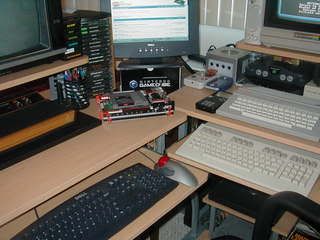
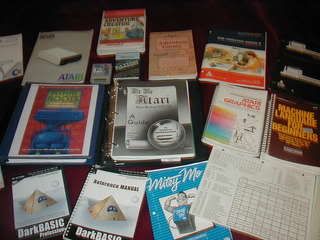

Van B
Moderator
23
Years of Service
User Offline
Joined: 8th Oct 2002
Location: Sunnyvale
Posted: 16th Apr 2007 02:35
Keeping it real huh zenassem .

I did a lot of stuff on the ST, and although the 16 colour palette was a drag, there was always ways to cheat. With proper timer interupts you could switch the pallete or change a colour at an exact scanline, so we would have copper backdrops and different palettes for score displays.

I made a few image viewers too, for .TGA files which POV rendered, you could quickly change the palette and screen to show a lot more colours than the ST was capable of. There was always stippling too, the Bitmap Bros did a lot of that with Gods, and it looks great:


Thing to remember is that these games were played on TV's, so you wouldn't spot the stippling as much, or the low resolution, it would actually blend quite nicely, so even if your using a limited palette, consider AA and colour usage if your hoping to replicate how these old games used to look. I always hated using a monitor on the ST because it killed the illusion, as soon as you see them in emulators on the PC they look horrible. Personally I prefer to play emu games on the XBox hooked upto a TV - there's a great ST emulator, and an Amiga emu for the XBox plus practically any other console from that era.


Good guy, Good guy, Wan...
zenassem
23
Years of Service
User Offline
Joined: 10th Mar 2003
Location: Long Island, NY
Posted: 16th Apr 2007 03:26
Awseome stuff Van B!

That Screenie Is better than anything Real-Time tha I did on the ST.

I got into SL interrupts on 8-bit Atari's. And it was truly the only way to get passed the color barrier.

I also dabbled around with the color stippling to get more colors out of the supposed [2 shades of 1 color] mode 7. By plotting pixels at at odd or even intervals you could extract color. First came acrossed it accidentally when viewing moire patterns, but didn't think there was any real way to control it. That is until I found it published in one of Computes! books. I was always into the graphic Demo scene to see what could be done vs. what was thought to be possible. Rather enjoyed those days.

Login to post a reply

Server time is: 2026-07-05 02:40:34
Your offset time is: 2026-07-05 02:40:34