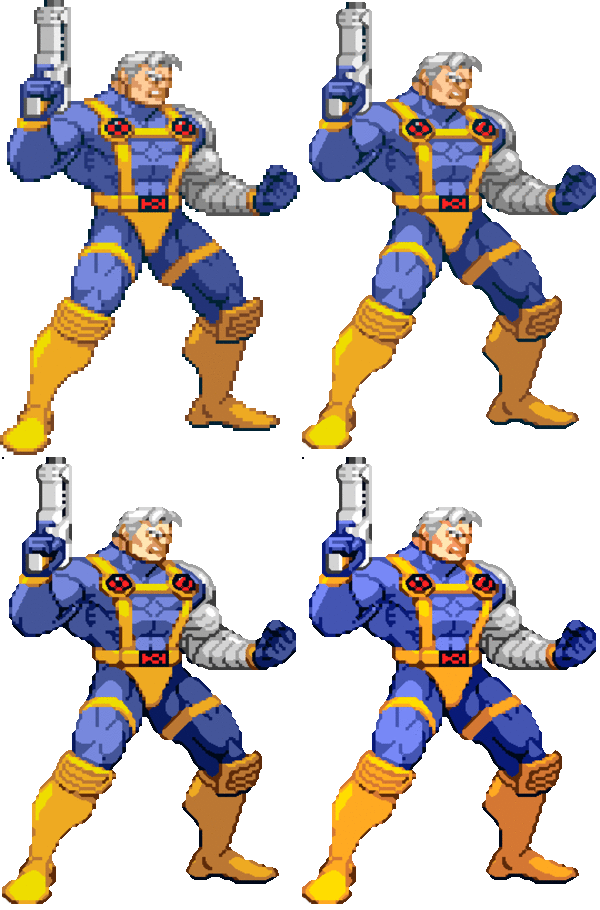
Okay, here is the final code for it:
Function PixelScale3x(Image, ContrastUp#, ContrastDown#, ColorEnhance#, LightBlend#, LightBlendMode)

    Make Memblock From Image 1, Image
    Delete Image Image
    ImageWidth = Memblock Dword(1, 0)
    ImageHeight = Memblock Dword(1, 4)
    ImageDepth = Memblock Dword(1, 8)

    Global TransparentColor As Dword
    Dim Image1(ImageWidth, ImageHeight)
    Position = 12
    For Y = 0 To ImageHeight - 1
        For X = 0 To ImageWidth - 1
            If Memblock Byte(1, Position+3) = 0 Then TransparentColor = Memblock Dword(1, Position)
            Image1(X, Y) = Memblock Dword(1, Position)
            Inc Position, 4
        Next Y
    Next X

    ImageWidth2 = ImageWidth * 3
    ImageHeight2 = ImageHeight * 3
    Make Memblock 2, 12 + 4 * ImageWidth2 * ImageHeight2
    Dim Image2(ImageWidth2, ImageHeight2)
    For Y = 0 To ImageHeight2 - 1
        For X = 0 To ImageWidth2 - 1
            Image2(X, Y) = TransparentColor
        Next Y
    Next X
    For Y = 1 To ImageHeight - 2
        For X = 1 To ImageWidth - 2
            CAL = Image1(X-1, Y-1) : CA = Image1(X, Y-1) : CAR = Image1(X+1, Y-1)
            CL  = Image1(X-1, Y)   : C  = Image1(X, Y)   : CR  = Image1(X+1, Y)
            CBL = Image1(X-1, Y+1) : CB = Image1(X, Y+1) : CBR = Image1(X+1, Y+1)
            NP1 = C : NP2 = C : NP3 = C
            NP4 = C : NP5 = C : NP6 = C
            NP7 = C : NP8 = C : NP9 = C
            If CL = CA And CL <> CB And CA <> CR Then NP1 = CL
            If CL = CA And CL <> CB And CA <> CR And C <> CAR Or CA = CR And CA <> CL And CR <> CB And C <> CAL Then NP2 = CA
            If CA = CR And CA <> CL And CR <> CB Then NP3 = CR
            If CB = CL And CB <> CR And CL <> CA And C <> CAL Or CL = CA And CL <> CB And CA <> CR And CR <> CBL Then NP4 = CL
            NP5 = C
            If CA = CR And CA <> CL And CR <> CB And C <> CBR Or CR = CB And CR <> CA And CB <> CL And CR <> CAR Then NP6 = CR
            If CB = CL And CB <> CR And CL <> CA Then NP7 = CL
            If CR = CB And CR <> CA And CB <> CL And C <> CBL Or CB = CL And CB <> CR And CL <> CA And C <> CBR Then NP8 = CB
            If CR = CB And CR <> CA And CB <> CL Then NP9 = CR
            If CAL = C : NP4 = CAL : NP2 = CAL : Endif
            If CAR = C : NP2 = CAR : NP6 = CAR : Endif
            If CBL = C : NP8 = CBL : NP4 = CBL : Endif
            If CBR = C : NP6 = CBR : NP8 = CBR : Endif
            If CA = C And CB = C : NP4 = C : NP6 = C : Endif
            If CL = C And CR = C : NP2 = C : NP8 = C : Endif
            X2 = X * 3 : Y2 = Y * 3
            Image2(X2-1, Y2-1) = NP1 : Image2(X2, Y2-1) = NP2 : Image2(X2+1, Y2-1) = NP3
            Image2(X2-1, Y2)   = NP4 : Image2(X2, Y2)   = NP5 : Image2(X2+1, Y2)   = NP6
            Image2(X2-1, Y2+1) = NP7 : Image2(X2, Y2+1) = NP8 : Image2(X2+1, Y2+1) = NP9
        Next Y
    Next X

    Write Memblock Dword 2, 0, ImageWidth2
    Write Memblock Dword 2, 4, ImageHeight2
    Write Memblock Dword 2, 8, ImageDepth

    If ContrastUp# > 0 And ContrastDown# > 0
    For Y = 0 To ImageHeight2 - 1
        For X = 0 To ImageWidth2 - 1
            If Image2(X, Y) <> TransparentColor
                If RGBR(Image2(X, Y)) > 127 And RGBG(Image2(X, Y)) > 127 And RGBB(Image2(X, Y)) > 127
                    PR = RGBR(Image2(X, Y)) + ContrastUp# : If PR > 255 Then PR = 255
                    PG = RGBG(Image2(X, Y)) + ContrastUp# : If PG > 255 Then PG = 255
                    PB = RGBB(Image2(X, Y)) + ContrastUp# : If PB > 255 Then PB = 255
                    Image2(X, Y) = RGB(PR,PG,PB)
                Endif
                If RGBR(Image2(X, Y)) < 127 And RGBG(Image2(X, Y)) < 127 And RGBB(Image2(X, Y)) < 127
                    PR = RGBR(Image2(X, Y)) - ContrastDown# : If PR < 0 Then PR = 0
                    PG = RGBG(Image2(X, Y)) - ContrastDown# : If PG < 0 Then PG = 0
                    PB = RGBB(Image2(X, Y)) - ContrastDown# : If PB < 0 Then PB = 0
                    Image2(X, Y) = RGB(PR,PG,PB)
                Endif
            Endif
        Next Y
    Next X
    Endif

    If ColorEnhance# > 0
    For Y = 0 To ImageHeight2 - 1
        For X = 0 To ImageWidth2 - 1
            If Image2(X, Y) <> TransparentColor
                CR = RGBR(Image2(X, Y)) : CG = RGBG(Image2(X, Y)) : CB = RGBB(Image2(X, Y))
                If CR > 170 Or CR > 85 And CG > 170 Or CG > 85 And CB > 170 Or CB > 85
                    If CR > CG And CR > CB
                        PR = CR + ColorEnhance#
                        If PR > 255 Then PR = 255
                    Else
                        PR = CR
                    Endif
                    If CG > CB And CG > CR
                        PG = CG + ColorEnhance#
                        If PG > 255 Then PG = 255
                    Else
                        PG = CG
                    Endif
                    If CB > CR And CB > CG
                        PB = CB + ColorEnhance#
                        If PB > 255 Then PB = 255
                    Else
                        PB = CB
                    Endif
                    Image2(X, Y) = RGB(PR,PG,PB)
                Endif
            Endif
        Next Y
    Next X
    Endif

    If LightBlend# > 0
    For Z = 1 To LightBlend#
    For Y = 1 To ImageHeight2 - 2
        For X = 1 To ImageWidth2 - 2
            If Image2(X, Y) <> TransparentColor
                If LightBlendMode = 0
                    If RGBR(Image2(X, Y)) > 170 And RGBG(Image2(X, Y)) > 170 And RGBB(Image2(X, Y)) > 170
                        If Image2(X-1, Y-1) <> TransparentColor : CAL = Image2(X-1, Y-1) : Else : CAL = Image2(X, Y) : Endif
                        If Image2(X, Y-1)   <> TransparentColor : CA  = Image2(X, Y-1)   : Else : CA  = Image2(X, Y) : Endif
                        If Image2(X+1, Y-1) <> TransparentColor : CAR = Image2(X+1, Y-1) : Else : CAR = Image2(X, Y) : Endif
                        If Image2(X-1, Y)   <> TransparentColor : CL  = Image2(X-1, Y)   : Else : CL  = Image2(X, Y) : Endif
                        If Image2(X, Y)     <> TransparentColor : C   = Image2(X, Y)     : Else : C   = Image2(X, Y) : Endif
                        If Image2(X+1, Y)   <> TransparentColor : CR  = Image2(X+1, Y)   : Else : CR  = Image2(X, Y) : Endif
                        If Image2(X-1, Y+1) <> TransparentColor : CBL = Image2(X-1, Y+1) : Else : CBL = Image2(X, Y) : Endif
                        If Image2(X, Y+1)   <> TransparentColor : CB  = Image2(X, Y+1)   : Else : CB  = Image2(X, Y) : Endif
                        If Image2(X+1, Y+1) <> TransparentColor : CBR = Image2(X+1, Y+1) : Else : CBR = Image2(X, Y) : Endif
                        PR = ((RGBR(C)*LightBlend#)+RGBR(CL)+RGBR(CR)+RGBR(CA)+RGBR(CB)+RGBR(CAL)+RGBR(CAR)+RGBR(CBL)+RGBR(CBR))/(8+LightBlend#)
                        PG = ((RGBG(C)*LightBlend#)+RGBG(CL)+RGBG(CR)+RGBG(CA)+RGBG(CB)+RGBG(CAL)+RGBG(CAR)+RGBG(CBL)+RGBG(CBR))/(8+LightBlend#)
                        PB = ((RGBB(C)*LightBlend#)+RGBB(CL)+RGBB(CR)+RGBB(CA)+RGBB(CB)+RGBB(CAL)+RGBB(CAR)+RGBB(CBL)+RGBB(CBR))/(8+LightBlend#)
                        Image2(X, Y) = RGB(PR,PG,PB)
                    Endif
                    If RGBR(Image2(X, Y)) < 85 And RGBG(Image2(X, Y)) < 85 And RGBB(Image2(X, Y)) < 85
                        If Image2(X-1, Y-1) <> TransparentColor : CAL = Image2(X-1, Y-1) : Else : CAL = Image2(X, Y) : Endif
                        If Image2(X, Y-1)   <> TransparentColor : CA  = Image2(X, Y-1)   : Else : CA  = Image2(X, Y) : Endif
                        If Image2(X+1, Y-1) <> TransparentColor : CAR = Image2(X+1, Y-1) : Else : CAR = Image2(X, Y) : Endif
                        If Image2(X-1, Y)   <> TransparentColor : CL  = Image2(X-1, Y)   : Else : CL  = Image2(X, Y) : Endif
                        If Image2(X, Y)     <> TransparentColor : C   = Image2(X, Y)     : Else : C   = Image2(X, Y) : Endif
                        If Image2(X+1, Y)   <> TransparentColor : CR  = Image2(X+1, Y)   : Else : CR  = Image2(X, Y) : Endif
                        If Image2(X-1, Y+1) <> TransparentColor : CBL = Image2(X-1, Y+1) : Else : CBL = Image2(X, Y) : Endif
                        If Image2(X, Y+1)   <> TransparentColor : CB  = Image2(X, Y+1)   : Else : CB  = Image2(X, Y) : Endif
                        If Image2(X+1, Y+1) <> TransparentColor : CBR = Image2(X+1, Y+1) : Else : CBR = Image2(X, Y) : Endif
                        PR = ((RGBR(C)*LightBlend#)+RGBR(CL)+RGBR(CR)+RGBR(CA)+RGBR(CB)+RGBR(CAL)+RGBR(CAR)+RGBR(CBL)+RGBR(CBR))/(8+LightBlend#)
                        PG = ((RGBG(C)*LightBlend#)+RGBG(CL)+RGBG(CR)+RGBG(CA)+RGBG(CB)+RGBG(CAL)+RGBG(CAR)+RGBG(CBL)+RGBG(CBR))/(8+LightBlend#)
                        PB = ((RGBB(C)*LightBlend#)+RGBB(CL)+RGBB(CR)+RGBB(CA)+RGBB(CB)+RGBB(CAL)+RGBB(CAR)+RGBB(CBL)+RGBB(CBR))/(8+LightBlend#)
                        Image2(X, Y) = RGB(PR,PG,PB)
                    Endif
                Endif
                If LightBlendMode = 1
                    If RGBR(Image2(X, Y)) > 170 And RGBG(Image2(X, Y)) > 170 And RGBB(Image2(X, Y)) > 170
                        If Image2(X-1, Y-1) <> TransparentColor : CAL = Image2(X-1, Y-1) : Else : CAL = Image2(X, Y) : Endif
                        If Image2(X, Y-1)   <> TransparentColor : CA  = Image2(X, Y-1)   : Else : CA  = Image2(X, Y) : Endif
                        If Image2(X+1, Y-1) <> TransparentColor : CAR = Image2(X+1, Y-1) : Else : CAR = Image2(X, Y) : Endif
                        If Image2(X-1, Y)   <> TransparentColor : CL  = Image2(X-1, Y)   : Else : CL  = Image2(X, Y) : Endif
                        If Image2(X, Y)     <> TransparentColor : C   = Image2(X, Y)     : Else : C   = Image2(X, Y) : Endif
                        If Image2(X+1, Y)   <> TransparentColor : CR  = Image2(X+1, Y)   : Else : CR  = Image2(X, Y) : Endif
                        If Image2(X-1, Y+1) <> TransparentColor : CBL = Image2(X-1, Y+1) : Else : CBL = Image2(X, Y) : Endif
                        If Image2(X, Y+1)   <> TransparentColor : CB  = Image2(X, Y+1)   : Else : CB  = Image2(X, Y) : Endif
                        If Image2(X+1, Y+1) <> TransparentColor : CBR = Image2(X+1, Y+1) : Else : CBR = Image2(X, Y) : Endif
                        PR = ((RGBR(C)*LightBlend#)+RGBR(CL)+RGBR(CR)+RGBR(CA)+RGBR(CB)+RGBR(CAL)+RGBR(CAR)+RGBR(CBL)+RGBR(CBR))/(8+LightBlend#)
                        PG = ((RGBG(C)*LightBlend#)+RGBG(CL)+RGBG(CR)+RGBG(CA)+RGBG(CB)+RGBG(CAL)+RGBG(CAR)+RGBG(CBL)+RGBG(CBR))/(8+LightBlend#)
                        PB = ((RGBB(C)*LightBlend#)+RGBB(CL)+RGBB(CR)+RGBB(CA)+RGBB(CB)+RGBB(CAL)+RGBB(CAR)+RGBB(CBL)+RGBB(CBR))/(8+LightBlend#)
                        Image2(X, Y) = RGB(PR,PG,PB)
                    Endif
                Endif
                If LightBlendMode = 2
                    If RGBR(Image2(X, Y)) < 85 And RGBG(Image2(X, Y)) < 85 And RGBB(Image2(X, Y)) < 85
                        If Image2(X-1, Y-1) <> TransparentColor : CAL = Image2(X-1, Y-1) : Else : CAL = Image2(X, Y) : Endif
                        If Image2(X, Y-1)   <> TransparentColor : CA  = Image2(X, Y-1)   : Else : CA  = Image2(X, Y) : Endif
                        If Image2(X+1, Y-1) <> TransparentColor : CAR = Image2(X+1, Y-1) : Else : CAR = Image2(X, Y) : Endif
                        If Image2(X-1, Y)   <> TransparentColor : CL  = Image2(X-1, Y)   : Else : CL  = Image2(X, Y) : Endif
                        If Image2(X, Y)     <> TransparentColor : C   = Image2(X, Y)     : Else : C   = Image2(X, Y) : Endif
                        If Image2(X+1, Y)   <> TransparentColor : CR  = Image2(X+1, Y)   : Else : CR  = Image2(X, Y) : Endif
                        If Image2(X-1, Y+1) <> TransparentColor : CBL = Image2(X-1, Y+1) : Else : CBL = Image2(X, Y) : Endif
                        If Image2(X, Y+1)   <> TransparentColor : CB  = Image2(X, Y+1)   : Else : CB  = Image2(X, Y) : Endif
                        If Image2(X+1, Y+1) <> TransparentColor : CBR = Image2(X+1, Y+1) : Else : CBR = Image2(X, Y) : Endif
                        PR = ((RGBR(C)*LightBlend#)+RGBR(CL)+RGBR(CR)+RGBR(CA)+RGBR(CB)+RGBR(CAL)+RGBR(CAR)+RGBR(CBL)+RGBR(CBR))/(8+LightBlend#)
                        PG = ((RGBG(C)*LightBlend#)+RGBG(CL)+RGBG(CR)+RGBG(CA)+RGBG(CB)+RGBG(CAL)+RGBG(CAR)+RGBG(CBL)+RGBG(CBR))/(8+LightBlend#)
                        PB = ((RGBB(C)*LightBlend#)+RGBB(CL)+RGBB(CR)+RGBB(CA)+RGBB(CB)+RGBB(CAL)+RGBB(CAR)+RGBB(CBL)+RGBB(CBR))/(8+LightBlend#)
                        Image2(X, Y) = RGB(PR,PG,PB)
                    Endif
                Endif
            Endif
        Next Y
    Next X
    Next Z
    Endif

    Position = 12
    For Y = 0 To ImageHeight2 - 1
        For X = 0 To ImageWidth2 - 1
            Write Memblock Dword 2, Position, Image2(X, Y)
            Inc Position, 4
        Next Y
    Next X

    Make Image From Memblock Image, 2
    Delete Memblock 1
    Delete Memblock 2
    UnDim Image1(0)
    UnDim Image2(0)

EndFunction
Resized Normally
Resized Using Function
Resized with Contrast Adjustment
Resized with Contrast Adjustment and Color Adjustment