Sorry your browser is not supported!

You are using an outdated browser that does not support modern web technologies, in order to use this site please update to a new browser.

Browsers supported include Chrome, FireFox, Safari, Opera, Internet Explorer 10+ or Microsoft Edge.

DarkBASIC Professional Discussion / Math Q: Move Object

Author
Message
Novaguy
17
Years of Service
User Offline
Joined: 1st Apr 2009
Location:
Posted: 3rd Nov 2011 00:08
Where can I see the code that implements "Move Object Forward/Up/Right"? This may seem off-topic, but bear with me...

I am currently working on a senior design project that uses a gyroscope to find the current angle relative to some calibration point. So I have X-Y-Z Euler angles.

The angles are fed through a filter that does some magic and error correction, and outputs X-Y-Z Tait-Bryan angles (pitch, yaw, roll). This code was already written, and the filter is too complicated to figure out right now.

Now I grab the accelerometer data that will tell me what direction the current object is moving in, but it is independent of pitch, yaw, and roll.

Basically, if the accelerometer tells me I'm moving in the Z direction, it really means that I'm giving it the command "Move Object 1,Zamount#" How does the Move Object use the current Euler angles (or Tait-Bryan angles, either work) to break down the forward movement into true x-y-z position changes? There's a matrix multiplication with quaternions and other barf... Is there a way I can see the code they used to implement the Object Move functions?
Latch
19
Years of Service
User Offline
Joined: 23rd Jul 2006
Location:
Posted: 3rd Nov 2011 02:20 Edited at: 3rd Nov 2011 21:29
@Novaguy

I think it does the transformation by projecting from the origin. What I mean is this:

Let's assume your object has never moved from (0,0,0) and it hasn't been rotated. The Object would be facing down the Z axis. Ok, big deal, right? Well, now we look at how far we want to move the thing using MOVE OBJECT obj, some distance.

Starting from (0,0,0) with no rotations, that will place the object straight down the z axis at our distance. Once we have that distance, we have a point that looks like (0,0,distance) .

Now if your object has moved and been rotated etc., it's not going to have a nice and neat destination of (0,0,distance). We have to rotate that point and then translate it back to the "REAL" position based on the "REAL" angles of your object.

In pseudo code, it might look something like:

[EDIT] I had to correct a bunch of typos in this! I typed, copied and pasted blocks of the psuedo over and over without changing the content. It must've been very confusing.


The actual rotations would be done using matrix math and the actual multiplication has been derived many times into a set of equations and I'm sure they are lurking nearby. I don't have em in front of me, but they are easy to look up. You can pretend it's not matrix math so you don't get frustrated!

If you need a quick example of what I'm talking about, I could knock one together without any trouble.

Enjoy your day.
Neuro Fuzzy
19
Years of Service
User Offline
Joined: 11th Jun 2007
Location:
Posted: 3rd Nov 2011 08:44 Edited at: 3rd Nov 2011 08:49
Yes, because you can get the source code to DBPro!

Without looking it up, I can tell you the math.

Basically, for DBPro's euler angles, you take a vector and FIRST rotate it around the X axis, then around the Y axis, then around the Z axis. Since each of those rotations can be expressed as rotation matrices, you can multiply a column vector by your X rotation matrix, then by y, then by Z. Eg, Z*Y*X*Vector=newVector

If you had a row vector it would be Vector*X*Y*Z, and the XYZ matrices would be a bit different. I prefer column vectors (for no particular reason other than they're what I usually use).

Really, what you need to know is that each individual rotation can be calculated as such:
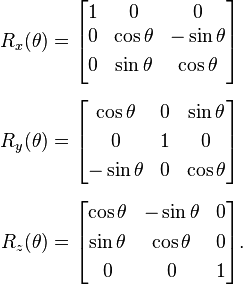

When you multiply Z*Y*X, you get:
http://www.freeimagehosting.net/uploads/3b4c8dfbe1.png

so if we call that R, R*V is the new, rotated vector.


Now... for what rotation matrices represent.

Really, they are JUST a set of axes.If you notice, rotation matrices are double orthogonal.

So, hold your left hand out, and raise your thumb, middle, and index finger so that they're all at 90 degrees to each other. This means that they are orthogonal. Your thumb is the x axis, your index finger is the y axis, and your middle finger is the Z axis. Move your hand so that your thumb is pointing right, your middle finger is pointing forward, and your index finger is pointing up. This is how DBPro does it.


Now imagine the origin is where your hand is. Try to come up with a position for the tips of each finger. The tip of your thumb, the X axis, would be at (1,0,0) (1 on the x axis), the tip of your index finger would be at (0,1,0), and the tip of your middle finger would be at (0,0,1).

now... if we make a matrix out of those, we get


An identity matrix!

Basically, a rotation matrix is EXACTLY like holding your hand out like I described above. When you rotate your hand, you wouldn't get nice values like 1,0,0, but you would get three vectors that are orthogonal, with length 1.


So, to move it forward, simply add the last column (Z vector) to the object's position! Since it's a unit vector, you can multiply it by the desired length before adding it to the position. The matrix has to be constructed anyways for rendering (though I don't think you can get direct access to it).


If your problem is turning yaw pitch roll angles into euler angles... that's kind of a tough one. First, you'll need to know if the yawpitchroll angles are right-handed or left-handed. Then, you'll need to construct the rotation matrix from the yaw pitch roll values, and turn the matrix back into euler angles. Luckily, there problem "How do I get euler angles from a matrix" has been solved a couple times before, here's a link to my use of someone elses solution http://forum.thegamecreators.com/?m=forum_view&t=188692&b=1. I think he's right: my getM4Element function transposes the matrix, but then I transpose it right back. Pointless, but it works. Just keep that in mind if you use getM4Element for anything else xD

As far as finding the yaw pitch roll matrix... This page http://planning.cs.uiuc.edu/node102.html gives a rotation matrix for a right-handed system, but DBPro and Direct3D both use left-handed coordinate systems. So...I think you can just rotate it 90 degrees about the X axis, and then flip the Z axis. That would look something like:


Since we know Z*Y*X, you'd just have to flip some signs and what not to compute the matrix.


IN SUMMATION
To move an object forward given DBPro euler angles, just use the last row of that rotation matrix. (same for moving up or right)

To get DBPro euler angles from YPR angles, calculate the matrix as described above (I think), and then use my function to calculate the euler angles.


So... It's a lot if you're not already familiar with linear algebra, but some programming problems will be a lot easier after you know 3d linear algebra stuff.
[edit]
it's worth mentioning that matrix stuff makes transformations (rotation, scaling, mirroring, skewing, translation) painless, because once you describe everything in matrix form, you can use matrix rules involving determinants, factorization, inversion, eigenvalue stuff, and more to easily solve geometric problems.

Errm... "Painless" means conceptually, and only if you're already familiar with linear algebra. Programming it in DBPro is also annoying because there's no operator overloading (So sometimes even though your calculation is "C=A*B" for two matrices, you have to write out 30 lines of "C.M11=A.M11*B.M11+A.M12*B.M21+A.M13+B.M31")

Braude Interactive
19
Years of Service
User Offline
Joined: 1st Aug 2006
Location: Sheffield, UK
Posted: 3rd Nov 2011 16:30
@ neuro fuzzy, these forums definitely need a like button. Wow.
Sven B
21
Years of Service
User Offline
Joined: 5th Jan 2005
Location: Belgium
Posted: 3rd Nov 2011 18:40 Edited at: 3rd Nov 2011 18:41
Hello,

I noticed this thread and I just wanted to add these two links:
http://code.google.com/p/darkbasicpro/source/browse/trunk/%20darkbasicpro%20--username%20LeeBamberTGC/Dark%20Basic%20Pro%20SDK/Shared/Objects/CPositionC.h
http://code.google.com/p/darkbasicpro/source/browse/trunk/%20darkbasicpro%20--username%20LeeBamberTGC/Dark%20Basic%20Pro%20SDK/Shared/Objects/CPositionC.cpp

Both are source files that deal with object position, scale and rotation. It might help you to understand how DBP deals with rotation internally.

[edit] It turns out that this forum is unable to turn these references into clickable links. Sorry, I guess you'll have to copy-paste them.

Cheers!
Sven B

Novaguy
17
Years of Service
User Offline
Joined: 1st Apr 2009
Location:
Posted: 10th Nov 2011 19:37
I'm sorry for my slow response, but school really piled on quickly this week. Thank you very much for your explanation NeuroFuzzy. I am familiar with linear algebra and fun maths stuff, and I had a feeling that this problem would be solved with a matrix. For some reason I was struggling with the math and trying to figure out quaternions, but your simple explanation showed me that I was really over-thinking the problem. Thank you for your response.

Latch's response was also a good introduction to yours .

To get the Euler angles now, I just need to either convert Pitch-Yaw-Roll to euler angles or find the quaternion conversion, but those will be precalculated matrices that I'm sure are hiding in the interwebs somewhere. Thank you again for all of your responses.
enderleit
19
Years of Service
User Offline
Joined: 30th May 2007
Location: Denmark
Posted: 11th Nov 2011 22:22
I wish I had Neuro Fuzzy's math skills

Login to post a reply

Server time is: 2026-07-10 23:13:11
Your offset time is: 2026-07-10 23:13:11