Sorry your browser is not supported!

You are using an outdated browser that does not support modern web technologies, in order to use this site please update to a new browser.

Browsers supported include Chrome, FireFox, Safari, Opera, Internet Explorer 10+ or Microsoft Edge.

FPSC Classic Product Chat / Flashlights - A question to the community

Author
Message
DarkJames
16
Years of Service
User Offline
Joined: 11th Aug 2009
Location:
Posted: 25th Aug 2012 05:19 Edited at: 25th Aug 2012 06:20


An Introduction


It has been said a thousand times or so, and requested even more, done only a few times, but in an unsuccesful, or just in a minimalistic fashion; Flashlights in FPS Creator. Whilst clever, most of them are glitchy, Them being [Amongst the few, at the least];

S4real Flashlight script [This portrayed a nice, slick hud, toning the ambience to 25 or so when pressed F, this presented some bugs, primarily when turning on/off]

Errant AI's L.E.Ds [This was a clever one, using muzzleflash to create a light, yet, the light seemed uneven and infininte]

There were more versions, including an overhaul on S4real's script, to include a battery, yet it showed the very same bugs as it's previous version.


The Idea


If your mind reaches back further enough, you will remember Corvus Mod; A "New" EFX mod, with LOD, and... Flashlight. This mod shown a flashlight with exquisite shadows, but that was actually engine-side. The flashlight was "Directional", built-in the code. Here's a few videos to explain my point;


Do I ask a full-flashlight system, with dynamic shadows?
Definetly not, I'm aware of the software's downpoints and capabilities.

Then what are you asking for?
Simply, a mod/or a modification to the current FPSC stabilized version [1.19.009] that includes this, a directional flashlight that actually resembles a flashlight, and not a hud, or a muzzleflash-trick.

Do it yourself, slacker.
Trust me, I would if I could, but I'm well aware that the community is more than capable of producing something amazing about this subject, often left aside.

Some images to illustrate directly what this flashlight would do in-engine. [If one of the images showcase Third Person, it is not part of this thread, solely the flashlight.]


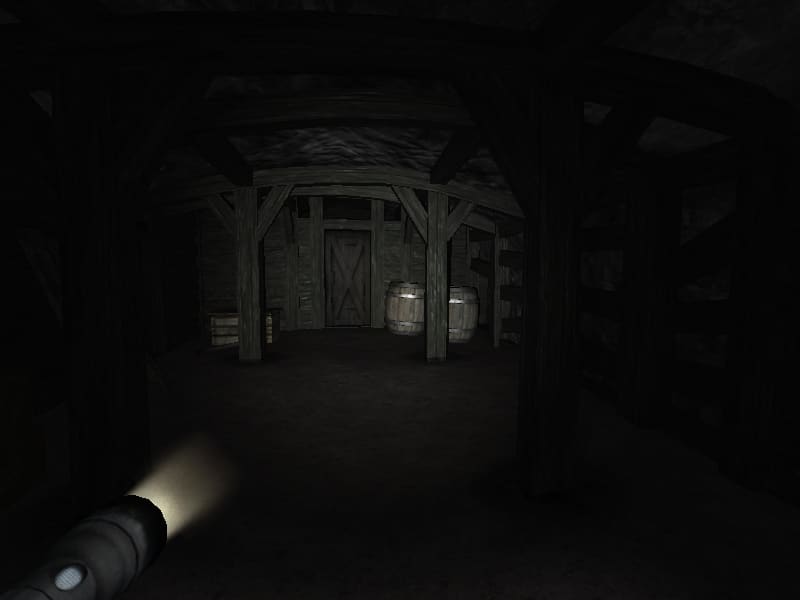


These are just examples, it wouldn't require an actual item on-screen, but simply a light. If this was already achieved in vanilla-fpsc, or an up-to-date mod can accomplish what I previously described, please link me to it.

The idea revolves around this;

On-Screen flashlight, triggered by a script, or coded in-system.
Would work as a Real Life flashlight, yet tending to the FPSC shadow quality. The light would bounce as a real flashlight, seen in the Corvus Mod video [See above], or simply, any of the images above, you can also play them to see for yourselves.
No item required or shown on-screen, yet the possibility to have an item linked to the flashlight, such as a lamp, a flashlight, or so.
A solution to all those interested and/or making a horror game/s, in dire need of flashlights, and consequently spamming the forums, this would resolve those issues in a good fashion, the community thanking the creator thoroughfully, since this has been asked since early 2006. [For the unaware, that is 6 years.]


An ending


I do hope this does not arouse a flame-war within the forums, Moderators can lock this at their taste, should they deem this unnapropiate, or a mere request. I would gladly, and actually encourage, the community posting their ideas, support and opinions on this matter.

[The thread could update in any moment.]

UPDATE:

I have found exactly what I meant, Zizaco's flashlight, however, he did edit FPSC-Game.exe, meaning that it is not compatible with 1.19.009.
Flashlight By Zizaco


------

The Zombie Killer
15
Years of Service
User Offline
Joined: 27th Mar 2011
Location: Gold Coast, Australia
Posted: 25th Aug 2012 06:31 Edited at: 25th Aug 2012 06:34
EAI's flashlight can actually be limited by using ammo, but it requires a little work by the user (it's not very hard though if you know how to make fpsc weapons)

The Scene Commander has flashlight code for FPSC on his website, I tried to port it to v1.19, even 1.20 but it crashed the engine.

Also, when I was working on CorVus mod plus (you can search for it, it's currently dead) I saw how Dark Goblin made the flashlight, sadly DBPro doesn't have the required functions for it by default though. The flashlight images you are showing will be 100% possible when the next release of CorVus comes out, which will probably be a long time though (months to years).

EDIT: Zizaco's flashlight seems like a simple modification, it probably just adds a command to show the flashlight HUD and then get the current ambience and then change it, or it simply emits a light from the player, later I might attempt to recreate it and let you know the results.

-TZK

DarkJames
16
Years of Service
User Offline
Joined: 11th Aug 2009
Location:
Posted: 25th Aug 2012 06:45 Edited at: 25th Aug 2012 07:02
Thank you lots for your feedback TZK, I will gladly and zealously await for your outcomes. Meanwhilst, if anybody has something to add, be sure to post below.

Addendum

I heard WASP 2.0 has an included flashlight, if this would be so, then no modding would be required to FPSC 1.19.009 and up, has anyone got a script for this "Flashlight"?

------
The Zombie Killer
15
Years of Service
User Offline
Joined: 27th Mar 2011
Location: Gold Coast, Australia
Posted: 25th Aug 2012 08:07 Edited at: 25th Aug 2012 08:19
SUCCESS!
It works perfectly. I'm just getting it ready for release now. It runs off of v1.20 beta 3.

EDIT: FPSC_Flashlight_r680.zip

Credit goes to The Scene Commander for developing the original code!

Instructions:
1. Install FPSC-Game.exe over your original, but back up the original first!
2. Copy the Flashlight.fpi file into your scriptbank
3. Put the script into a trigger zone in your map
4. "F" toggles the flashlight

-TZK

Pirate Myke
16
Years of Service
User Offline
Joined: 31st May 2010
Location: El Dorado, Ca
Posted: 25th Aug 2012 09:27 Edited at: 25th Aug 2012 10:25
Yes you did. Great job. I will be posting a video real quick.
Thanks for the download. Works great.

Video:


And the range and color are programmable by script.

Very nice.

Another with the range at 300 and the color yellowish.


The Storyteller 01
17
Years of Service
User Offline
Joined: 11th May 2009
Location: On a silent hill in dead space
Posted: 25th Aug 2012 16:46 Edited at: 25th Aug 2012 16:48
I think I have tried most Flashlight scripts out there, but I always run into the same problem:

Every script seems to tinker with the ambience which means that the maps cannot include daylight areas because then the Flashlight would kind of turn the light off and any huds would completely break the gameplay.

A simple set of AMBIENCE=X,AMBIENCEGREATER=X and AMBIENCELOWER=X conditions would solve the problem but we still have only actions regarding ambience in the code...

In case you find my grammar and spelling weird ---> native German speaker ^^
ASTECH
18
Years of Service
User Offline
Joined: 18th Jul 2007
Location:
Posted: 25th Aug 2012 18:32
Yes! Yes! Yes!

Great work all around. Thanks to Scene and Zombie Killer. I can now re-do my map with the proper feel I wanted.

PC Specs: AMD X4 2.7Ghz, 8GB DDR3 RAM, Nvidia 9800GT, Win. 7 Pro 64 Bit
DarkJames
16
Years of Service
User Offline
Joined: 11th Aug 2009
Location:
Posted: 25th Aug 2012 18:58
Very well, thanks, TZK, does it have the capability of showing a HUD?

------
bruce3371
15
Years of Service
User Offline
Joined: 4th Aug 2010
Location: Englishland
Posted: 25th Aug 2012 19:08
I've always used this one with good results;

http://forum.thegamecreators.com/?m=forum_view&t=179916&b=23

Admittedly it does tinker with the ambience as Storyteller pointed out, but I find it does give good results.

DarkJames
16
Years of Service
User Offline
Joined: 11th Aug 2009
Location:
Posted: 25th Aug 2012 19:33
Hm.


Quote: "S4real Flashlight script [This portrayed a nice, slick hud, toning the ambience to 25 or so when pressed F, this presented some bugs, primarily when turning on/off]"


It's just an edit of this one.

------
ASTECH
18
Years of Service
User Offline
Joined: 18th Jul 2007
Location:
Posted: 25th Aug 2012 19:38
Quote: "Very well, thanks, TZK, does it have the capability of showing a HUD?"


The script needs to call on a certain hud to cover the screen when pressing F. Taking a look at the Syntax Script list can get you started or tinker with a script that calls for huds in it (ex. DoorKey.

You will learn quick by just looking and experimenting.

PC Specs: AMD X4 2.7Ghz, 8GB DDR3 RAM, Nvidia 9800GT, Win. 7 Pro 64 Bit
DarkJames
16
Years of Service
User Offline
Joined: 11th Aug 2009
Location:
Posted: 25th Aug 2012 19:42
Again, I'm not even "Started" with scripting, thus I wouldn't know where to list states and so. "In slang", I'm a noob at it.

------
BlackFox
FPSC Master
18
Years of Service
User Offline
Joined: 5th May 2008
Location: Knight to Queens Bishop 3
Posted: 25th Aug 2012 20:03 Edited at: 25th Aug 2012 20:07
Quote: "Very well, thanks, TZK, does it have the capability of showing a HUD?
"


Yes, you can define a hud in the script for the flashlight. We've made custom huds for all our flashlights in our developments.

For example, I can use the original "flash.dds" from the flashlight script s4real designed. Using his hud and the code in the source for the flashlight (similar to what TZK used), we can get the following:

Starting out in a dark corridor


Turning flashlight on


Turning a corner


Small room


The script is quite easy. Notice I am displaying a "hud" (flash- which blackens the area around the light).


Here are some color variations:

Royal Blue


Orange Red


Medium Sea Green


Twitter: @NFoxMedia
DarkJames
16
Years of Service
User Offline
Joined: 11th Aug 2009
Location:
Posted: 25th Aug 2012 20:07 Edited at: 25th Aug 2012 20:11
Thank you, Blackfox! Also, TZK, is this compatible with 1.19.009? The light engine on 1.20 is completely glitched, and pretty much ruins all lights in my level.

Addendum

I believe that such a helpful addition to FPSC should have it's own thread, or Scene Commander could actually compile it with a new version of 1.20 or 1.19 [Since 1.20's light engine is quite "Ruined"]

------
BlackFox
FPSC Master
18
Years of Service
User Offline
Joined: 5th May 2008
Location: Knight to Queens Bishop 3
Posted: 25th Aug 2012 20:25
Quote: "I believe that such a helpful addition to FPSC should have it's own thread,"


There is an area. It is called FPSC Feature Creep.


Twitter: @NFoxMedia
ncmako
14
Years of Service
User Offline
Joined: 19th Feb 2012
Location: Hendersonville,NC
Posted: 25th Aug 2012 21:13
@TZK
Thank you very much. Really appreciate this. Works great with a hud.
ASTECH
18
Years of Service
User Offline
Joined: 18th Jul 2007
Location:
Posted: 26th Aug 2012 04:58
I compiled a game with the .exe and my game crashes upon loading the level. I thought I'd give a heads up.

PC Specs: AMD X4 2.7Ghz, 8GB DDR3 RAM, Nvidia 9800GT, Win. 7 Pro 64 Bit

Login to post a reply

Server time is: 2026-07-05 13:36:38
Your offset time is: 2026-07-05 13:36:38