@Mobiius, I've taken a look at the videos, and they look nice, but they lack the flexibility of normal vector fonts. Don't get me wrong, in a game (especially for release, monetised), a bitmap font is almost certainly the way to go.
As it happens though, I've been working on Sasuke's method and the result could fairly easily be adjusted to generate baseline (ascent, descent, etc. - collectively "metrics") data for bitmap fonts as well (since in both cases its looking at a bitmap of a font character).
So here's what I've got.
commands and notes
User Commands
-----------------
InitFontMetrics ( datafileLocation as string )
    Sets up font metrics system, builds table and retrieves any saved data.
    Will be called automatically in first call to GetFontMetric if not called before.

GenerateFontMetrics ( fontName as string, forceRegen as boolean )
    Will produce metrics for this font each supported style and metric.
    Will be called automatically by GetFontMetric (retrieve mode) if requested data is missing.

GetFontMetric ( fontName as string, style as string, metricName as string, retrieve as boolean )
    In non-retrieve mode, will return 1 (1.0, float) if requested metric data exists.
    In retrieve mode, will return the value of the metric.

SaveFontMetrics ( fontName as string )
    Will update or add font record in metrics file.
    Called automatically by GenerateFontMetrics (if fontMetricsAutoUpdateFile = 1).


Util Commands
-----------------
ExpandFontStyleName$ ( initial$ )
    IN  OUT
    --  ----------
    N   normal
    B   bold
    I   italic
    C   bolditalic

ExpandFontStyleNumber$ ( initial$ )
    IN  OUT
    --  ----------
    N   0
    B   1
    I   2
    C   3


Private Commands
-----------------
GenerateFontMetrics_Sub ( fontId, key as string, testChars as string, yDir, analyseMethod )
    For each test character, and according to yDir, tests against an output bitmap to estimate metrics.

SetFontMetric ( fontName as string, style as string, metricName as string, metricValue as string )
    Sets fontName -> style -> metric value.

LoadFontMetrics ()
    Retrieves saved metrics data from file.


// //////////////////////////////////////
	Outline:
	- [todo]

	Sampling:	[todo]

	Metrics:	[note: removedfrom-, addedto+ set of tested chars in development.]
				[      Mdl: Modal, most common.]
				Maximum:	Top of:		Text box							  eg. 0%
				Ascent:		Mdl Top of:	h										 21%
				Cap height:	Top of:		T	h	H	I							 23%
				x-Height:	Mdl Top of:	u	v	x	z							 46%
				Baseline:	Mdl Btm of:	i	.	E	I	Z	x	m	X	M		 80%
				Descent:	Btm of:		g	p	y	j+	/	|-	_-				 92%
				Minimum:	Btm of:		Text box

	Table:		FontMetricsLookup: "[FontName]->[Style]->[Metric]" -> Value.
			eg. "Calibri->italic->baseline" -> "0.8"

	File Header:
				v[Num] NBIC [List of supported metrics -> 128 chars]

	File Record:
				YYYYMMDDHHMMSSMMMM LN [Name]\n							 24+nameLen
				s1m1xxxxxx s1m2xxxxxx s1m3xxxxxx s1m4xxxxxx s1m5xxxxxx\n 4*(11*numMet+1)	|
				s2m1xxxxxx s2m2xxxxxx s2m3xxxxxx s2m4xxxxxx s2m5xxxxxx\n					| each row is a style
				s3m1xxxxxx s3m2xxxxxx s3m3xxxxxx s3m4xxxxxx s3m5xxxxxx\n					| each column is a metric
				s4m1xxxxxx s4m2xxxxxx s4m3xxxxxx s4m4xxxxxx s4m5xxxxxx\n					|

				eg. Calibri, NBIC, 5 Metrics:
					nameLen=7, numMet=5, recordsize = 27 + 4*56 = 27 + 224 = 251.
				@NOTE: Assumes same set of styles and metrics for all stored fonts. If other, or mixed, will behave unpredictably ("break").

	@NOTE: Metrics are customisable for file but otherwise hardcoded. Yet could
	       fairly easily be data-ized.
 	@NOTE: For absent fonts where a fallback is used silently, generated metrics will
           be off should the correct font be installed.
    @NOTE: [Fixed] Generating metrics for empty font name wipes datafile
    @NOTE: Maybe store the font hit-test size in file, and provide option for
 		   overwriting lower-res (less accurate) data should higher-res ones be made?
////////////////////////////////////// //
set display mode desktop width(), desktop height(), 32, 1
sync on : sync rate 30 : sync

global scrW, scrH
scrW = screen width()
scrH = screen height()


// - - - Example - - - - - -
// setup some fonts.
dim font$(18)
font$( 1) = "Calibri"	: font$( 2) = "Cambria"		: font$( 3) = "Sketch Rockwell"
font$( 4) = "Arial"		: font$( 5) = "Courier New"	: font$( 6) = "Freestyle Script"
font$( 7) = "Georgia"	: font$( 8) = "Batang"		: font$( 9) = "Arial Narrow"
font$(10) = "Impact"	: font$(11) = "Tunga"		: font$(12) = "Lucida Handwriting"
font$(13) = "Verdana"	: font$(14) = "Juice ITC"	: font$(15) = "Comic Sans MS"
font$(16) = "Tahoma"	: font$(17) = "FrankRuehl"	: font$(18) = "DigitalStrip"

// can init font metrics system here, or lazily with first call to GenerateFontMetrics.
`InitFontMetrics("")

// can generate font metrics upfront like this, or lazily with GetFontMetric.
center text scrW/2, scrH/2, "Generating Font Metrics..."
for f = 1 to 18
	box 0, scrH/2+15, scrW, scrH/2+30, 0xff060C18 : center text scrW/2, scrH/2+15, str$(f) + "/18 - " + font$(f) : sync
	GenerateFontMetrics(font$(f), 0)
	center text scrW/2, scrH+15, "dummy text for a printing bug, pay no mind"
next f


// Main.
f0 = a2createfont("Verdana", 8, a2size_char(), 0)	// metric line label font.
do
	cls 0

	// pick a random font with random style and size.
	fontName$ = font$(1+rnd(17))
	s$ = mid$(FONTMETRICS_SUPPORTEDSTYLES, 1+rnd(3))		// styles: NBIC
	style$ = ExpandFontStyleName$(s$)						// N -> normal, B -> bold..
	styleI = ExpandFontStyleNumber(s$)						// N -> 0, B -> 1..
	szF1 = 20 + rnd(50) : szF2 = max(szF1+30, rnd(130))		// f2 is bigger than f1.
	if f1 <> 0 then a2deletefont f1 : a2deletefont f2		// clear up previous fonts
	f1 = a2createfont(fontName$, szF1, a2size_char(), styleI)
	f2 = a2createfont(fontName$, szF2, a2size_char(), styleI)

	// Top example: show text with each metric indicated with a coloured line.
	// Each metric is a norm. 0.0-1.0 scalar, where 0.0 = top and 1.0 = bottom;
	// Times this value by text height to find the line for the font at this size and style.
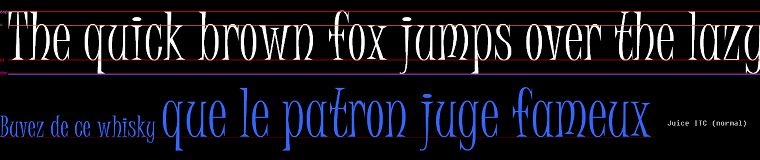
	a2text f2, 16, 0, "The quick brown fox jumps over the lazy dog.", 0xffffffff
	v# =                                                                      0 : a2line 15, v#, scrW, v#, 0xff3366ff	// blue (topmost)
	v# = GetFontMetric(fontName$, style$, "ascent",    1) * a2getlineheight(f2) : a2line 15, v#, scrW, v#, 0xffff00b0 : a2text f0, 0, v#-4, "asc", 0xb0ff00b0	// pink (high)
	v# = GetFontMetric(fontName$, style$, "capHeight", 1) * a2getlineheight(f2) : a2line 15, v#, scrW, v#, 0xff908080 : a2text f0, 0, v#-4, "cap", 0xb0908080	// grey
	v# = GetFontMetric(fontName$, style$, "xHeight",   1) * a2getlineheight(f2) : a2line 15, v#, scrW, v#, 0xffff8000 : a2text f0, 0, v#-4, "x",   0xb0ff8000	// brown-ish
	b2#= GetFontMetric(fontName$, style$, "baseline",  1) * a2getlineheight(f2) : a2line 15, b2#,scrW, b2#,0xffff0000 : a2text f0, 0, b2#-4,"bl",  0xb0ff0000	// red
	v# = GetFontMetric(fontName$, style$, "descent",   1) * a2getlineheight(f2) : a2line 15, v#, scrW, v#, 0xffff00b0 : a2text f0, 0, v#-4, "dsc", 0xb0ff00b0	// pink (low)
	v# =                                                    a2getlineheight(f2) : a2line 15, v#, scrW, v#, 0xff3366ff	// blue (bottommost)

	y# = scrH*0.33 : a2line 0, y#, scrW, y#, 0x20ff0000
	b1# = GetFontMetric(fontName$, style$, "baseline", 1) * a2getlineheight(f1)
	s1$ = "Buvez de ce whisky " : s2$ = "que le patron juge fameux"
	a2text f1, 0, y# - b1#, s1$, 0xff3366ff
	a2text f2, a2gettextwidth(f1,s1$), y#-b2#, s2$, 0xff3366ff

	center text scrW/2, scrH*0.66, fontName$ + " (" + style$ + ")"
	center text scrW/2, scrH*0.66+15, "press key to show another font..."

	sync : nice wait key : nice wait no key
loop


// - - - FONT METRICS SYSTEM - - - - - - - - - - - - - - - - - - - - - - - - - - -
global fontMetricsTable = 0
global fontMetricsDatafileLocation as string
global fontMetricsAutoUpdateFile as boolean			` if 0, keep list of re/gen'd fonts and manually call SaveFontMetrics(fontName) on each.
#constant FONTMETRICS_VERSION              "1"
#constant FONTMETRICS_FONTHITTESTSIZE      600		` [def:800] bigger -> higher res -> more accurate, but slower to generate.
#constant FONTMETRICS_NUMSUPPORTEDSTYLES   4
#constant FONTMETRICS_NUMSUPPORTEDMETRICS  5
#constant FONTMETRICS_SUPPORTEDSTYLES      "NBIC"
#constant FONTMETRICS_SUPPORTEDMETRICS     "ascent, capHeight, xHeight, baseline, descent"
#constant FONTMETRICS_DEFAULT_DATAFILELOCATION "fontMet.dat"
#constant FONTMETRICS_DEFAULT_AUTOUPDATEFILE   1
function InitFontMetrics(datafileLocation as string)
	// create lookup table.
	fontMetricsTable = find free lookup()
	make lookup fontMetricsTable

	fontMetricsAutoUpdateFile = FONTMETRICS_DEFAULT_AUTOUPDATEFILE

	// get existing data if available.
	if datafileLocation = "" then datafileLocation = FONTMETRICS_DEFAULT_DATAFILELOCATION
	fontMetricsDatafileLocation = datafileLocation
	if file exist(datafileLocation) = 1
		err = LoadFontMetrics()
	else
		// start new metrics file.
		SaveFontMetrics("")
	endif
endfunction

function GenerateFontMetrics(fontName as string, forceRegen as boolean)
	// has metrics system been init'd yet?
	if fontMetricsTable = 0 then InitFontMetrics("")

	// cancel if bad font name.
	if fontName = "" or len(fontName) > 0xFF
		exitfunction 0
	endif

	// if metrics already exist, cancel (unless forcing).
	if forceRegen = 0
		if GetFontMetric(fontName, "normal", "baseline", 0)
			exitfunction 1
		endif
	endif

	// re/generate metrics for supported styles.
	for s = 1 to 4
		style$ = mid$(FONTMETRICS_SUPPORTEDSTYLES, s)
		if style$ <> "x"
			style$ = ExpandFontStyleName$(style$)
			fontId = a2createfont(fontName, FONTMETRICS_FONTHITTESTSIZE, a2size_char(), s-1)
			GenerateFontMetrics_Sub(fontId, fontName+"->"+style$+"->ascent",    "h", 1, 1)
			GenerateFontMetrics_Sub(fontId, fontName+"->"+style$+"->capHeight", "THhI", 1, 0)
			GenerateFontMetrics_Sub(fontId, fontName+"->"+style$+"->xHeight",   "uvxz", 1, 0)
			GenerateFontMetrics_Sub(fontId, fontName+"->"+style$+"->baseline",  "i.EIZxmXM", -1, 0)
			GenerateFontMetrics_Sub(fontId, fontName+"->"+style$+"->descent",   "gpyj/", -1, 1)
			a2deletefont fontId

			// enforce some constraints.
			// ascent must be at least as high as capHeight.
			v# = GetFontMetric(fontName, style$, "capHeight", 1)
			if GetFontMetric(fontName, style$, "ascent", 1) > v# then SetFontMetric(fontName, style$, "ascent", str$(v#,6))
		endif
	next s


	// update metrics file.
	if fontMetricsAutoUpdateFile
		SaveFontMetrics(fontName)
	endif
endfunction 1

function ExpandFontStyleName$(initial$)
	select initial$
		case "N" : result$ = "normal"	  : endcase
		case "B" : result$ = "bold"		  : endcase
		case "I" : result$ = "italic"	  : endcase
		case "C" : result$ = "bolditalic" : endcase
		case default : result$ = "none"   : endcase
	endselect
endfunction result$

function ExpandFontStyleNumber(initial$)
	select initial$
		case "N" : result = 0		: endcase
		case "B" : result = 1		: endcase
		case "I" : result = 2		: endcase
		case "C" : result = 3		: endcase
		case default : result = 0	: endcase
	endselect
endfunction result

// analyseMethod:	0: use height with highest count.
//					1: use minimum distance height.
function GenerateFontMetrics_Sub(fontId, key as string, testChars as string, yDir, analyseMethod)
	local bmId, bmWidth, width, height, testLen, xStep, yStep, yStart, yEnd

	bmOldId = current bitmap()

	// setup.
	// make bitmap to size of largest test character.
	testLen = len(testChars)
	for ch = 1 to testLen
		bmWidth = max(bmWidth, a2gettextwidth(fontId, mid$(testChars, ch)))
	next ch
	height = a2getlineheight(fontId)

	bmId = find free bitmap()
	create bitmap bmId, bmWidth, height

	// height counting array.
	local dim hitCount(height)

	// gather data.
	// prepare to scan in correct direction.
	yStep = yDir * 1 `max(1, height*0.001) `0.01)
	if yDir = 1
		yStart = 0 : yEnd = height
	else
		yStart = height : yEnd = 0
	endif

	// for each character...
	for ch = 1 to testLen
		ch$ = mid$(testChars, ch)

		// draw char to bitmap to test against.
		cls 0
		a2text fontId, 0, 0, ch$, 0xffffffff

		width = a2gettextwidth(fontId, ch$)
		xStep = max(1, width*0.02)

		lock pixels

		for x = 0 to width step xStep
			for y = yStart to yEnd step yStep
				p = point(x,y)
				if p > 0
					// record a hit here.
					`set current bitmap 0 : a2circle x, y, 2, 0xffff0000 : set current bitmap bmId
					inc hitCount(y)
					`hitCount(y) = hitCount(y) + 1
					exit
				endif
			next y
		next x

		unlock pixels
	next ch


	// analyse.
	select analyseMethod
		case 0
			// find most-hit height.
			mostHitY = 0
			for y = yStart to yEnd step yStep
				if hitCount(y) > hitCount(mostHitY) then mostHitY = y
			next y
		endcase
		case 1
			// find min-dist height.
			mostHitY = yStart
			for y = yStart to yEnd step yStep
				if hitCount(y) > 0 then mostHitY = y : exit
			next y
		endcase
	endselect

	// set metric.
	result as float
	result = mostHitY*1.0 / height
	set lookup fontMetricsTable, key, str$(result,6)

	// cleanup.
	set current bitmap bmOldId
	`copy bitmap 1, 0
	delete bitmap bmId
	undim hitCount()
endfunction

// retrieve:	0: return 1 if available, 0 if not.
//				1: return metric value if available,
//				   generates metric value then returns it if not available.
function GetFontMetric(fontName as string, style as string, metricName as string, retrieve as boolean)
`	font exist

	// keys are in format [fontname]->[style]->[metric]
	if search lookup(fontMetricsTable, fontName+"->"+style+"->"+metricName)
		if retrieve
			// pass back the metric value itself.
			v# = val(lookup current value$(fontMetricsTable))
			exitfunction v#
		else
			// pass back a value indicating success.
			exitfunction 1.0
		endif
	else
		if retrieve
			// metrics don't exist, generate.
			if GenerateFontMetrics(fontName, 1)
				v# = val(lookup current value$(fontMetricsTable))
				exitfunction v#
			endif
		endif
	endif
endfunction 0.0

function SetFontMetric(fontName as string, style as string, metricName as string, metricValue as string)
	set lookup fontMetricsTable, fontName+"->"+style+"->"+metricName, metricValue
endfunction

function LoadFontMetrics()
	local fileName as string
	fileName = fontMetricsDatafileLocation

	fileId = find free datafile()
	err = open datafile to read(fileId, fileName)

	// read header, check it agrees with program assumptions.
	fileString$ = datafile string$(fileId)
	headerVerified = 0
	if left$(fileString$, 1+len(FONTMETRICS_VERSION)) = "v" + FONTMETRICS_VERSION
		if mid$(fileString$, 8, 4) = FONTMETRICS_SUPPORTEDSTYLES
			split csv string mid$(fileString$, 13, 0)
			mNum = split count()
			if mNum = FONTMETRICS_NUMSUPPORTEDMETRICS
				if get split word$(1) = "ascent" and get split word$(2) = "capHeight" and get split word$(3) = "xHeight" and get split word$(4) = "baseline" and get split word$(5) = "descent"
					headerVerified = 1
				endif
			endif
		endif
	endif

	if headerVerified = 0 then exitfunction 0

	// loop through records.
	fileByte = 142								// start after file header.
	set datafile position fileId, fileByte
	fileString$ = datafile string$(fileId)		// get first font record header.
	while datafile end(fileId) = 0 				  `fileString$ <> "#EOF"
		file_nameLen = hex to decimal( mid$(fileString$, 20, 2) )				 // get font name length.
		file_name$ = mid$(fileString$, 23, file_nameLen)						 // get font name.

		// get metrics details from record.
		// @FIXME: this (and equivalent save function part) bit messy.
		offset = 25 + file_nameLen
		for s = 1 to 4
			style$ = mid$(FONTMETRICS_SUPPORTEDSTYLES, s)
			if style$ = "x"
				// unsupported style, skip..
			else
				set datafile position fileId, fileByte+offset
				fileString$ = datafile string$(fileId)
				split csv string FONTMETRICS_SUPPORTEDMETRICS
				for m = 1 to FONTMETRICS_NUMSUPPORTEDMETRICS
					metricName$ = get split word$(m)
					if metricName$ = "?"
						// future metric, skip..
					else
						// known metric, get data.
						v$ = mid$(fileString$, 11*(m-1)+1, 10)
						SetFontMetric(file_name$, ExpandFontStyleName$(style$), metricName$, v$)
					endif
				next m
			endif

			// go to next style.
			inc offset, 11*FONTMETRICS_NUMSUPPORTEDMETRICS+1
		next s

		// go to next record.
		inc fileByte, 24+file_nameLen + 4*(11*FONTMETRICS_NUMSUPPORTEDMETRICS+1)
		set datafile position fileId, fileByte
		fileString$ = datafile string$(fileId)									 // get font header.
	endwhile

endfunction 1

function SaveFontMetrics(fontName as string)
	local fileName as string
	fileName = fontMetricsDatafileLocation

	if fontName = ""
		// new file.
		fileId = find free datafile()
		err = open datafile to write(fileId, fileName)

		if err = 0 then exit prompt str$(fileId) + ", " + fileName, "failed to open" : end

		// Header. Must be 7+5+128 = 140 characters.
		// begin with FontMetrics system version number. (7 chars)
		fileBuffer$ = padright$("v" + left$(FONTMETRICS_VERSION, 5), 6) + " "

		// next indicate supported styles. (5 chars)
		// 4 chars, NBIC, where N=Normal, B=Bold, I=Italic, C=BoldItalic.
		// if a style is not to be supported, replace with "x", eg. no italic: NBxC.
		fileBuffer$ = fileBuffer$ + FONTMETRICS_SUPPORTEDSTYLES + " "

		// lastly indicate supported metrics. (128 chars)
		// comma-seperated list. Indicate possible future metrics with "?" item, eg. "ascent, capHeight, ?, xHeight, baseline, descent, ?, ?, ?".
		fileBuffer$ = fileBuffer$ + padright$(left$(FONTMETRICS_SUPPORTEDMETRICS, 128), 128)	// @FIXME: a truncated list is pointless...

		// write header.
		datafile string type fileId, 7
		write datafile string fileId, fileBuffer$ + cr$() + lf$()` + "#EOF"

		close datafile fileId
	else

		// either update existing record or add new.
		fileId = find free datafile()
		err = open datafile to read(fileId, fileName)

		// scan for record.
		file_recordByte = 0
		fileByte = 142								// start after file header.
		set datafile position fileId, fileByte
		fileString$ = datafile string$(fileId)		// get first font record header.
		while datafile end(fileId) = 0 				  `fileString$ <> "#EOF"
			`print fileString$
			file_nameLen = hex to decimal( mid$(fileString$, 20, 2) )				 // get font name length.
			file_name$ = mid$(fileString$, 23, file_nameLen)							 // get font name.
			`print fileByte, " - ", file_nameLen, ", ", file_name$, ", ", fontName
			if file_name$ = fontName then file_recordByte = fileByte : exit
			inc fileByte, 24+file_nameLen + 4*(11*FONTMETRICS_NUMSUPPORTEDMETRICS+1) // skip to next record.
			set datafile position fileId, fileByte
			fileString$ = datafile string$(fileId)									 // get font header.
		endwhile

		// finished with datafile in read mode.
		close datafile fileId

		// construct new record.
		// start with current date and time. [19 chars: YYYYMMDDHHMMSSMMMM ] @FIXME: Not currently crucial data anyway, but: DST .___.
		dllK32 as dword   : dllK32 = load dll("Kernel32")
		ptrDT = alloc(16) : call function ptr get ptr to dll function(dllK32, "GetSystemTime"), ptrDT
		unload dll dllK32
		date$ = str$(peek word(ptrDT)) + padleft$(str$(peek word(ptrDT+2)), "0", 2) + padleft$(str$(peek word(ptrDT+6)), "0", 2)
		date$ = date$ + padleft$(str$(peek word(ptrDT+8)), "0", 2) + padleft$(str$(peek word(ptrDT+10)), "0", 2) + padleft$(str$(peek word(ptrDT+12)), "0", 2) + padleft$(str$(peek word(ptrDT+14)), "0", 4)
		fileBuffer$ = date$ + " "

		// add fontname, with size in hex [4+nameLen+2].
		fileBuffer$ = fileBuffer$ + right$(padleft$(hex$(len(fontName)), "0", 2), 2) + " " + fontName + cr$() + lf$()

		// add metrics data.
		for s = 1 to 4
			style$ = mid$(FONTMETRICS_SUPPORTEDSTYLES, s)
			if style$ = "x"
				// unsupported style, generate line of blank data.
				fileBuffer$ = fileBuffer$ + replace all$(space$(FONTMETRICS_NUMSUPPORTEDMETRICS-1), " ", "0000000000 ") + "0000000000" + cr$() + lf$()
			else
				mBuffer$ = ""
				split csv string FONTMETRICS_SUPPORTEDMETRICS
				for m = 1 to FONTMETRICS_NUMSUPPORTEDMETRICS
					metricName$ = get split word$(m)
					if metricName$ = "?"
						// future metric, blank data.
						mBuffer$ = mBuffer$ + "0000000000"
					else
						// known metric, add data.
						// 10 chars: 0.1234 -> "0.12340000", 125.48 -> "125.480000"
						v# = GetFontMetric(fontName, ExpandFontStyleName$(style$), metricName$, 1)
						v  = int(v#)
						mBuffer$ = mBuffer$ + left$(str$(v#, max(0, 9-len(str$(v)))), 10)
					endif
					// seperator between metric data fields.
					if m < FONTMETRICS_NUMSUPPORTEDMETRICS then mBuffer$ = mBuffer$ + " "
				next m
				fileBuffer$ = fileBuffer$ + mBuffer$ + cr$() + lf$()
			endif
		next s

		if file_recordByte = 0
			// add new record.
			err = open datafile to append(fileId, fileName)
			datafile string type fileId, 7
			write datafile string fileId, fileBuffer$
			close datafile fileId
		else
			// update old record.
			err = open datafile to update(fileId, fileName)
			datafile string type fileId, 7
			set datafile position fileId, file_recordByte
			write datafile string fileId, fileBuffer$
			close datafile fileId
		endif
	endif

endfunction
Diggsey's Advanced2D (linked in an above post)
IanM's Matrix1Utils
Output
 Try:
Try:
Run the example once, it will generate metrics for each font. Current progress is shown on screen. This process takes about a minute.
Run the example again, it will finish in about a second.
On the first run the metrics for each font have been saved to a file (FontMet.dat, in the same folder as the exe).
On the second run these were loaded, and nothing new needed generating. Hence the time difference.
The contents of FontMet.dat after running the example:
v1     NBIC ascent, capHeight, xHeight, baseline, descent
201312282208290130 07 Calibri
0.22404400 0.26229501 0.39890701 0.77868801 0.92486298
0.22404400 0.26229501 0.39617500 0.77868801 0.92486298
0.22404400 0.26229501 0.39890701 0.77868801 0.92486298
0.22404400 0.26229501 0.39617500 0.77868801 0.92486298
201312282208330674 07 Cambria
0.21479400 0.24182101 0.41251799 0.80938798 0.99573302
0.21479400 0.24182101 0.39687100 0.80938798 0.99431002
0.21479400 0.24182101 0.41251799 0.80938798 0.99573302
0.21479400 0.24182101 0.39687100 0.80938798 0.99431002
201312282208390142 0F Sketch Rockwell
0.16618501 0.16763000 0.34103999 0.77312100 0.99855500
0.16618501 0.16763000 0.34103999 0.77312100 0.99855500
0.16618501 0.16763000 0.34103999 0.77312100 0.99566501
0.16618501 0.16763000 0.34103999 0.77312100 0.99566501
201312282208430656 05 Arial
0.16865700 0.16865700 0.34477600 0.80895501 0.99701500
0.16865700 0.16865700 0.34477600 0.80895501 0.99850702
0.16865700 0.16865700 0.34477600 0.80895501 0.99701500
0.16865700 0.16865700 0.34477600 0.80895501 0.99850702
201312282208480276 0B Courier New
0.19411799 0.23088200 0.36176500 0.73382401 0.89999998
0.17647099 0.21323501 0.34411800 0.73382401 0.91764700
0.19411799 0.23088200 0.36176500 0.73382401 0.89999998
0.17647099 0.21323501 0.34411800 0.73382401 0.91764700
201312282208530173 10 Freestyle Script
0.19546700 0.19688401 0.44617599 0.70538199 0.90226603
0.18980201 0.19121800 0.43484399 0.68980199 0.91076499
0.33144501 0.44759199 0.44617599 0.68980199 0.84419298
0.32719499 0.46175599 0.43484399 0.68980199 0.85552400
201312282208570880 07 Georgia
0.14222901 0.19648100 0.38416401 0.80498499 0.99560100
0.14222901 0.19648100 0.37976500 0.80498499 0.99560100
0.14222901 0.19648100 0.38416401 0.80498499 0.99560100
0.14222901 0.19648100 0.38416401 0.80498499 0.99560100
201312282209020710 06 Batang
0.13333300 0.13833299 0.38000000 0.85833299 0.99833298
0.12500000 0.13333300 0.37166700 0.85833299 0.99500000
0.13166700 0.13833299 0.38000000 0.85833299 0.99833298
0.12500000 0.13333300 0.37166700 0.85833299 0.99500000
201312282209070294 0C Arial Narrow
0.18114901 0.18114901 0.35640600 0.81296003 0.99852699
0.18950400 0.18950400 0.36297399 0.81486899 0.99708498
0.17629600 0.17629600 0.35259300 0.81185198 0.99851900
0.19040699 0.19040699 0.36337200 0.81395298 0.99709302
201312282209110573 06 Impact
0.17896201 0.17896201 0.29508200 0.82513702 0.91666698
0.17486300 0.17486300 0.28961700 0.82513702 0.91530102
0.17896201 0.17896201 0.29508200 0.82513702 0.91666698
0.17486300 0.17486300 0.28961700 0.82513702 0.91530102
201312282209170293 05 Tunga
0.24944100 0.24944100 0.35234901 0.62192398 0.73266202
0.24384800 0.24384800 0.34451899 0.62192398 0.73042500
0.24944100 0.24944100 0.35234901 0.62192398 0.73266202
0.24384800 0.24384800 0.34451899 0.62192398 0.73042500
201312282209220549 12 Lucida Handwriting
0.08311700 0.18311700 0.36233801 0.73896098 0.99870098
0.07792200 0.17922100 0.35454500 0.74026000 0.99480498
0.08441600 0.18311700 0.36233801 0.73896098 0.99870098
0.08051900 0.17922100 0.35454500 0.75454497 0.99480498
201312282209270187 07 Verdana
0.20164600 0.22908100 0.37860101 0.82578897 0.99588501
0.20164600 0.22908100 0.37585700 0.82578897 0.99588501
0.20164600 0.22908100 0.37860101 0.82578897 0.99588501
0.20164600 0.22908100 0.37585700 0.82578897 0.99588501
201312282209310300 09 Juice ITC
0.14831100 0.14831100 0.33627000 0.80176198 0.98825300
0.14390600 0.14390600 0.32745999 0.80176198 0.98531598
0.14831100 0.14831100 0.33627000 0.80176198 0.98825300
0.14390600 0.14390600 0.32745999 0.80176198 0.98531598
201312282209360463 0D Comic Sans MS
0.23086099 0.26794299 0.42822999 0.80741602 0.99880397
0.23086099 0.26913899 0.42464101 0.80502403 0.99880397
0.23086099 0.26794299 0.42822999 0.78947401 0.99880397
0.23086099 0.26913899 0.42822999 0.80382800 0.99880397
201312282209410113 06 Tahoma
0.19889501 0.22651900 0.37707201 0.82734799 0.99861902
0.19889501 0.22651900 0.37430900 0.82734799 0.99861902
0.19889501 0.22651900 0.37707201 0.82734799 0.99861902
0.19889501 0.22651900 0.37430900 0.82734799 0.99861902
201312282209450477 0A FrankRuehl
0.16865700 0.16865700 0.34477600 0.80895501 0.99701500
0.16865700 0.16865700 0.34477600 0.80895501 0.99850702
0.16865700 0.16865700 0.34477600 0.80895501 0.99701500
0.16865700 0.16865700 0.34477600 0.80895501 0.99850702
201312282209500039 0C DigitalStrip
0.13076900 0.13076900 0.14615400 0.85538501 0.87076902
0.07846200 0.08461500 0.09230800 0.89846200 0.92461503
0.13076900 0.13692300 0.14000000 0.84307700 0.86923099
0.07846200 0.08923100 0.09384600 0.90615398 0.92461503
Give it a try

It's still work-in-progress (I'll be tweaking test character sets and how hit-test results are interpreted), and the approach has obvious limitations: fonts with big swishes will be poorly described, and non-horizontal text just won't work. So I'm still interested if anyone (ianM, diggsey... :V ) can sneak direct access to this data through, say, a dll?
