Sorry your browser is not supported!

You are using an outdated browser that does not support modern web technologies, in order to use this site please update to a new browser.

Browsers supported include Chrome, FireFox, Safari, Opera, Internet Explorer 10+ or Microsoft Edge.

DarkBASIC Professional Discussion / Skymatter textures used for 2D backdrop

Author
Message
tiresius
23
Years of Service
User Offline
Joined: 13th Nov 2002
Location: MA USA
Posted: 21st May 2014 03:22
Hey folks-

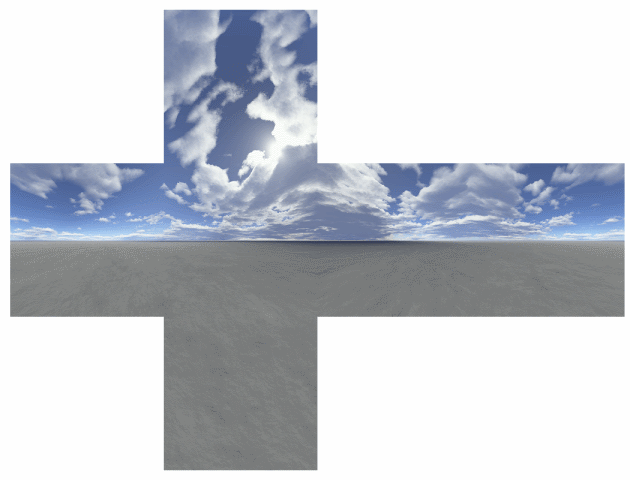
Is there a way to get Sky Matter skybox textures stitched together to look good for a 2D side-scroller? Perhaps some steps in Paint Shop Pro or Photoshop Elements to reverse the perspective?

I have all these skybox textures I bought, but now that I'm making 2D games they are not being used...

Thanks for any help!

Barry Pythagoras
12
Years of Service
User Offline
Joined: 14th Mar 2014
Location:
Posted: 21st May 2014 11:47
Any image can be flipped and have the seam edited. The quick way in Photoshop is to use the clone tool to hide the seam. You can also spin a skybox in the Y axis if you make it really big... scale + 1000, and put the player forwards z + 1000, and that will stop the ground from spinning too fast. (those sizes are guesses, play around with them). Most backdrops for 2D games can be made in about 10 minutes anyway, so just grab a google image of sky, and another image of mountains, and you have parallax in no time.
Van B
Moderator
23
Years of Service
User Offline
Joined: 8th Oct 2002
Location: Sunnyvale
Posted: 21st May 2014 12:22
I think the point is that a lot of the Skymatter textures are really nice, and not the sort of thing you can reproduce easily.

I would load up 1 image, and make it 4x wider, then paste on the other sides of the skybox. With 4 textures side by side, it would repeat and be nice and big - it's not a bad idea IMO.

I'd be happy to make an example, just let me know which Skymatter skybox you'd like, and I'll stitch it together for you.

I am the one who knocks...
tiresius
23
Years of Service
User Offline
Joined: 13th Nov 2002
Location: MA USA
Posted: 21st May 2014 16:38
Thanks for the tips.

Hi VanB,
I tried that very technique with one of the skybox textures and it looked pinched at the edges. I thought maybe the textures were warped at the edges to make the skybox appear correctly from within (i.e. when two perpendicular sides meet at an angle it compensates the perspective). I'll try it again and see if I was mistaken.

Van B
Moderator
23
Years of Service
User Offline
Joined: 8th Oct 2002
Location: Sunnyvale
Posted: 21st May 2014 18:01
Ahh - I wonder if it would be better to re-scan the skybox texture - like from within DBPro, grab the vertical line in the middle of the screen for however wide you want the image... that might get around the problem.

I have every skymatter pack, so I'll see if that makes a difference, I think it should, but it just means a bit more fiddling when converting the skybox.

I am the one who knocks...
tiresius
23
Years of Service
User Offline
Joined: 13th Nov 2002
Location: MA USA
Posted: 21st May 2014 18:17
I saw prior skybox to skysphere posts and was wondering if something similar could be done to make a simple panoramic. Or otherwise whatever trickery they do to make skybox textures in a graphics program can be undone by reversing the settings with hopefully minimal reduction in quality.

They also have these low-res "example" images in the folders, mocking me.

Chris Tate
DBPro Master
17
Years of Service
User Offline
Joined: 29th Aug 2008
Location: London, England
Posted: 21st May 2014 19:35 Edited at: 21st May 2014 19:37
Edit.

The results will not be perfect because the corners of the cubemap are procedurally generated to render scenery that is further away than the scenery in the middle of the side images.

Might be worth considering making the clouds out of sprites, particles or a shader.

wattywatts
17
Years of Service
User Offline
Joined: 25th May 2009
Location: Michigan
Posted: 21st May 2014 20:41
Just overlap them on separate layers in Photoshop, turn feathering on and cut them so you take the warped parts of the clouds out. Might need to use the smudge tool a bit to make everything meet up correctly.
I don't have the images or I'd do it for you, but I don't think it would be that hard.
TheComet
18
Years of Service
User Offline
Joined: 18th Oct 2007
Location: I`m under ur bridge eating ur goatz.
Posted: 21st May 2014 22:00 Edited at: 21st May 2014 22:04
A cubemap is created with a 90° lens, so that's all the information require to do an inverse projection. Gimp has something that comes close to correcting this, however, if you know what you're doing, you may as well write a small program yourself.

Here's the gimp tutorial:


If you do it in GIMP, you can crop the resulting picture to get a rectangle again. Ideally, you'd want to not stretch the edges of the image outwards, but stretch the inside of the image towards the edge of the image.

TheComet

Your mod has been erased by a signature
Derek Darkly
14
Years of Service
User Offline
Joined: 22nd Sep 2011
Location: Whats Our Vector, Victor?
Posted: 21st May 2014 22:33
What about loading the textures into a Skybox and then perform 90 degree turns and do GET IMAGE 4 times?

(Just a theory, I haven't tried this.)

666GO†O666
Van B
Moderator
23
Years of Service
User Offline
Joined: 8th Oct 2002
Location: Sunnyvale
Posted: 22nd May 2014 01:36
The problem? (not really a problem) is that a skybox is designed to be viewed from any direction, I think grabbing the middle vertical line and pasting that, say for 4x the resolution for 360 degrees. That should correct the perspective at the corners.

I am the one who knocks...
Green Gandalf
VIP Member
21
Years of Service
User Offline
Joined: 3rd Jan 2005
Playing: Malevolence:Sword of Ahkranox, Skyrim, Civ6.
Posted: 22nd May 2014 02:06
Quote: "What about loading the textures into a Skybox and then perform 90 degree turns and do GET IMAGE 4 times?"


Sounds like a good idea - and easy to test too.


Powered by Free Banners
Chris Tate
DBPro Master
17
Years of Service
User Offline
Joined: 29th Aug 2008
Location: London, England
Posted: 22nd May 2014 17:03 Edited at: 22nd May 2014 17:37
Quote: "What about loading the textures into a Skybox and then perform 90 degree turns and do GET IMAGE 4 times?""


Indeed, but the problem is the warped scenery at the edges of each image

Quote: "I tried that very technique with one of the skybox textures and it looked pinched at the edges. I thought maybe the textures were warped at the edges to make the skybox appear correctly from within (i.e. when two perpendicular sides meet at an angle it compensates the perspective). "


It is best illustrated with clearly defined vanishing points within an architectural scene:


The middle composition demonstrates the outcome. The scenery gets near, then far, then near again and so on.


Personally I would have created the clouds manually, there are many ways and tutorials demonstrating them.

Otherwise, programmatically speaking, you might be able to use a shader and image kit to implement a sine wave sampling algorithm to bring the pixels closer together where they are close, and further apart where they are far. You could achieve the same effect without programming by deforming a set of vertex dense 3D planes or using the warp to in Photoshop, or what TheComet stated about the Gimp.

Let us know how you get on, I would not mind learning how to reverse engineer a warped cubemap scene into a flat image.

Green Gandalf
VIP Member
21
Years of Service
User Offline
Joined: 3rd Jan 2005
Playing: Malevolence:Sword of Ahkranox, Skyrim, Civ6.
Posted: 22nd May 2014 17:44
Why not use the method used in the DBPro LTypeDemo?


Powered by Free Banners
Derek Darkly
14
Years of Service
User Offline
Joined: 22nd Sep 2011
Location: Whats Our Vector, Victor?
Posted: 22nd May 2014 23:36 Edited at: 22nd May 2014 23:40
I didn't have any trouble using these images as they were, except that I had to resize them to the window dimensions to avoid some weird horizontal lines in the images.

Images are from the free skymatter demo download.
Rather jumpy, but graphically it looks good.


666GO†O666
Chris Tate
DBPro Master
17
Years of Service
User Offline
Joined: 29th Aug 2008
Location: London, England
Posted: 23rd May 2014 09:35 Edited at: 23rd May 2014 09:38
Although you can tell that it is a cube map particularly where the grass texture appears to diverge and the sun loses its circular shape; you can clean that up in about 15 minutes in TheGimp or photoshop.

It looks good.

Derek Darkly
14
Years of Service
User Offline
Joined: 22nd Sep 2011
Location: Whats Our Vector, Victor?
Posted: 23rd May 2014 17:47
This one would be sort of funny as a scroller though, because you'd pass the same sun over and over... LoL

666GO†O666
Green Gandalf
VIP Member
21
Years of Service
User Offline
Joined: 3rd Jan 2005
Playing: Malevolence:Sword of Ahkranox, Skyrim, Civ6.
Posted: 23rd May 2014 18:38
Very true.


Powered by Free Banners
Chris Tate
DBPro Master
17
Years of Service
User Offline
Joined: 29th Aug 2008
Location: London, England
Posted: 23rd May 2014 19:09
Lol, I thought about that but assumed the goal was to have it scroll real slow in the distance of a parallax side scrolling engine; a bit like the old Sonic games.

Derek Darkly
14
Years of Service
User Offline
Joined: 22nd Sep 2011
Location: Whats Our Vector, Victor?
Posted: 25th May 2014 00:36 Edited at: 25th May 2014 00:37
Oh yeah... I guess it could be worked out mathematically that 1 level equaled 1 full scroll of the images.

666GO†O666
tiresius
23
Years of Service
User Offline
Joined: 13th Nov 2002
Location: MA USA
Posted: 27th May 2014 06:05
This is all good stuff, thank you for the ideas. I might end up using VanB's suggestion of grabbing a thin slice of the screen and rotate the camera around 360 degrees. Whether I use a loop with point() function or get image() remains to be seen.

I haven't done DB in a while so I feel like an archaeologist going back in time to recover the lost treasures of my skyboxes.

If I write up something worthy I'll post it here for all to enjoy. I remember the skybox tutorial code flipping some of the textures wrong so I'll have to extract it out of my old project.

Login to post a reply

Server time is: 2026-07-06 02:53:30
Your offset time is: 2026-07-06 02:53:30