Sorry your browser is not supported!

You are using an outdated browser that does not support modern web technologies, in order to use this site please update to a new browser.

Browsers supported include Chrome, FireFox, Safari, Opera, Internet Explorer 10+ or Microsoft Edge.

DarkBASIC Professional Discussion / I Give Up! What is this called?

Author
Message
Sasuke
20
Years of Service
User Offline
Joined: 2nd Dec 2005
Location: Milton Keynes UK
Posted: 21st Dec 2014 01:02 Edited at: 21st Dec 2014 01:08
Seriously the one nightmares of programming is not knowing the names of things cause there's no possible way you could guess off the bat and trying to explain half the stuff you need to do is impossible with some things. The last thing I did I had to quit cause no one knew what it was called on various forums and there was no way I could look for reference material for the technique without the name of it. So I'm simplify the process, What is this and how do I do it?

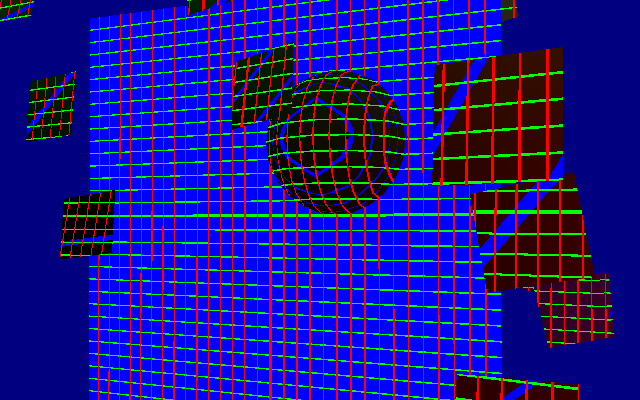
Basically for my 3d editor I want to project a 3d grid in what I imagine is in world space, so no matter where an object is or it's orientation a grid will be placed accurately on it, pic:


So what type of projection (if it's that) is this? If I know that then least I have something to look for cause at the moment, trying to look for grid based projection turns up every water shader on the planet!

"Get in the Van!" - Van B
Kezzla
17
Years of Service
User Offline
Joined: 21st Aug 2008
Location: Where beer does flow and men chunder
Posted: 21st Dec 2014 01:42
you could use a plane with the texture of the grid as your guide. you would then check the position of an object and adjust to match the grid.

eg 10 x 10unit squares. object is placed at position 87 store 87 as an integer and divide it by 10. you will get square 9 multiply 9 by the size of the unit and you have the placed co-ordinate.

If that is what you are asking.

You could also look into the D3d Plugin for Dbpro. It will let you draw a 3d line. you could draw up a grid of 3d lines to make your projected mesh.


if you are more after that specific command, you may need to texture everything with the grid texture, and then offset the uv co-ordinate using the position in world as a multiplier.
This with a little tweaking (and better maths than I have) should create the effect you picture above.

Hope that is helpful

To Err is Human...
To Arr is Pirate!
Rudolpho
20
Years of Service
User Offline
Joined: 28th Dec 2005
Location: Sweden
Posted: 21st Dec 2014 02:34
I guess what you're getting at is that you want to set the transform matrix of the grid object to that of the selected object?
This will make it appear at the same position (translation), with the same rotation as the selected object. It will however also have the same scaling as that object, which may or may not be desirable. If it is not you'll have to set the scaling factors yourself.

As Kezzla said, the easiest way to achieve this with DBP is probably to just set the position and rotation (and, if desired, scaling) of the grid plane to the same as the source object has. If you have those functions you could also do something like:

I'm not sure if those functions exist / have those names but you get the idea. You can also add offsets like if you want your grid object to be at -50 units along the Y axis from the pivot point of your source object etc.
The matrix in question is a world matrix or transform, which is used for projecting vertex positions from local space into world space, if you want to search for that. But again, the behaviour you describe really just boils down to sharing positions and rotations; there's nothing specific that requires care to be put on projections here in particular ("projection" usually refers to how you convert the 3D positional data into a 2D representation for drawing on a flat surface).

The Tall Man
12
Years of Service
User Offline
Joined: 16th Nov 2013
Location: Earth
Posted: 21st Dec 2014 03:34 Edited at: 21st Dec 2014 03:39
It's a simple enough question - you'd think the solution would be readily available with a simple command...

Well one other option...

In DarkGDK, there's a command

dbSetObjectWireframe (int iObject, int iFlag)

It likely has a DBPro counterpart, such as:

Set Object Wireframe

...or something like that.

It will cause the object to be drawn as a wireframe (between the vertices) rather than as solid. So you could create your objects with vertices laid out in a grid-fashion at whatever resolution you wanted your grid to be - although that would doing it the long way and would be inefficient w/ all the extra vertices. But it's one option...

As a slight variation of this, you could have a plane that is 1 grid square. Then overlay and repeat that plane around your objects to create your grid. This might be easier in practice, but it would result in twice as many vertices as not using this variation.

Judging what we see is the greatest blinder and self-limiter in the universe.

What we perceive is never reality. It is only a story we tell ourselves based on our current perspective, which has far more to do with our beliefs about ourselves than with anything else.
The Tall Man
12
Years of Service
User Offline
Joined: 16th Nov 2013
Location: Earth
Posted: 21st Dec 2014 03:48
I would think it would be called "grid projection". Sounds straight-forward enough!

Actually - a far better idea than the one I just mentioned! Although it would be a bit mathematical, and may slow down performance a bit. But you could step through your vertices and do your own 2D projection - draw 2D lines in their appropriate screen-coordinates. So you'd have 2D lines with your 3D camera in the background. The final result would look authentic.

http://en.wikipedia.org/wiki/Isometric_projection

So perhaps some combination of this idea and what Kezzla suggested. The plugin he suggested might save you a lot of work.

Judging what we see is the greatest blinder and self-limiter in the universe.

What we perceive is never reality. It is only a story we tell ourselves based on our current perspective, which has far more to do with our beliefs about ourselves than with anything else.
The Tall Man
12
Years of Service
User Offline
Joined: 16th Nov 2013
Location: Earth
Posted: 21st Dec 2014 03:51
Another idea - and this would be the simplest of all...

You could use a grid texture image. Somewhere in this forum is a way to change texture filtering methods in DBPro. There may be a filtering method you could select that would allow your textured grid lines to appear as just lines without reduction/enlargement from filtering.

Judging what we see is the greatest blinder and self-limiter in the universe.

What we perceive is never reality. It is only a story we tell ourselves based on our current perspective, which has far more to do with our beliefs about ourselves than with anything else.
The Tall Man
12
Years of Service
User Offline
Joined: 16th Nov 2013
Location: Earth
Posted: 21st Dec 2014 04:36 Edited at: 21st Dec 2014 04:37
Here's a thread that's highly related to your question.

DBPro / 2D Isometric view with a 3D camera/scene:
http://forum.thegamecreators.com/?m=forum_view&t=160985&b=1

Judging what we see is the greatest blinder and self-limiter in the universe.

What we perceive is never reality. It is only a story we tell ourselves based on our current perspective, which has far more to do with our beliefs about ourselves than with anything else.
Derek Darkly
14
Years of Service
User Offline
Joined: 22nd Sep 2011
Location: Whats Our Vector, Victor?
Posted: 21st Dec 2014 16:21 Edited at: 21st Dec 2014 16:22
Just out of curiosity, what is the purpose of having the grid?
Is is for snapping points, or just a visual gauge of some sort?

In my unfinished 3D editor (I think 'Procrastineditor' must be the working title) I am using the cheap but visually appealing (appalling?) technique of a green square.


MonoCoder
20
Years of Service
User Offline
Joined: 4th Dec 2005
Location: england
Posted: 21st Dec 2014 20:24
I've had a try with a shader using advice from here. Not sure if it's what you're after but it seems near.

DBP:


worldposgridtest.fx:


screen:


.
Burning Feet Man
18
Years of Service
User Offline
Joined: 4th Jan 2008
Location: Sydney, Australia
Posted: 21st Dec 2014 23:41
Very cool effect!

Help build an online DarkBASIC Professional help archive.
DarkBasic Help Wikia
Sasuke
20
Years of Service
User Offline
Joined: 2nd Dec 2005
Location: Milton Keynes UK
Posted: 23rd Dec 2014 14:14 Edited at: 23rd Dec 2014 14:17
Thanks for all the help guys so far, sorry for the late reply, been busy. Okay, so this is gonna be for my editor, though only for brushes. Currently I just use a grid made out of triangle to form a centre of the world. Example:


*note, that menu there is just a simple debug tool, not the editor...

Triangle's are quite affective when constructing 3d lines. But cause I can manipulate brushes similar to a 3d modeller, I wanted guideline grids in all axes at whatever settings I give them.

MonoCoder found what I was looking for or well thanks to him I could define this as Planar Mapping. In fact, it would need to be changed to TriPlanar Mapping cause there needs to be blending at different angles so you don't get weird stretched lines. But looking at that, there's a bit of an overhead. But Planar Mapping is useful cause I can just get a plane with a grid on it, position the plane to the camera.xy (or others) and it will look like the grid will scroll infinitely at little cost. It's also great for guildline's of which I'll demo when I get back to you.

I might pursue TriPlanar mapping, just so I have it available for other things. Though I'm having a little trouble working out how to get the world-space normal for use in the pixel shader. Need to look into this more.

So cheers for the big help guys and suggestions, I'll get to work on this and show you what I needed it for, easier to show than explain.

"Get in the Van!" - Van B
Dar13
18
Years of Service
User Offline
Joined: 12th May 2008
Location: Microsoft VisualStudio 2010 Professional
Posted: 27th Dec 2014 19:58
Sorry to be late to the party, but wouldn't this be orthogonal projection of a texture onto the scene? I have no idea how you'd do that in DBP but I think that's the gist of what you're trying to do.

Sasuke
20
Years of Service
User Offline
Joined: 2nd Dec 2005
Location: Milton Keynes UK
Posted: 28th Dec 2014 00:10 Edited at: 28th Dec 2014 00:10
Well you'd need 6 orthogonal projections, 2 for each axis then blending them all together would be a nightmare and a massive performance hit.

The current method TriPlanar Mapping works well for what I need, just need to work on blending. The current method I'm using works well, just need to add directional lighting so objects have some edge to them but lighting can come later.

What I've got so far in my basic constructor:


"Get in the Van!" - Van B

Login to post a reply

Server time is: 2026-07-05 12:09:52
Your offset time is: 2026-07-05 12:09:52