Sorry your browser is not supported!

You are using an outdated browser that does not support modern web technologies, in order to use this site please update to a new browser.

Browsers supported include Chrome, FireFox, Safari, Opera, Internet Explorer 10+ or Microsoft Edge.

DarkBASIC Professional Discussion / make a crater in a terrain after an explosion???

Author
Message
Bighead92
19
Years of Service
User Offline
Joined: 27th Dec 2006
Location: Switzerland
Posted: 21st Jan 2007 17:36
Hi,
I`m trying to make a game like worms but I just dont know how to make such craters after an explosion.
Can you help me??
RUCCUS
21
Years of Service
User Offline
Joined: 11th Dec 2004
Location: Canada
Posted: 21st Jan 2007 18:52
Mesh deformation is a really advanced technique that can get very complicated, Id recommend you dont try getting it works right yet. Getting the numbers of the vertices at a given point would be extremely hard in itself as it is.

MExe
19
Years of Service
User Offline
Joined: 11th Jan 2007
Location:
Posted: 21st Jan 2007 19:03
I hope he would just do a 2D thing...
Image All
20
Years of Service
User Offline
Joined: 30th Dec 2005
Location: Home
Posted: 21st Jan 2007 19:23 Edited at: 21st Jan 2007 19:23
Maybe you could put an object there with a normal-map shader or something.. o.O The hard part would be trying to get the mesh to conform to the shape of what it is covering, although you might be able to do/mimic that with a shader as well.

TEH_CODERER
22
Years of Service
User Offline
Joined: 12th Nov 2003
Location: Right behind you!
Posted: 21st Jan 2007 19:51
The best way I have found is to make a memblock from the terrain image then editing the memblock and finally making the image from the update memblock. If you want 3D then you can try matrices and then editing heights when an impact occurs. If you think one of those is the best way to go but want more help then let me know.

Bighead92
19
Years of Service
User Offline
Joined: 27th Dec 2006
Location: Switzerland
Posted: 21st Jan 2007 20:26
OK thanks I`l try to edit the heights of the matrices but there`s one problem. Is it possible to convert a matrix to a static rigid body mesh?
Because i want to use some physics too.
JerBil
22
Years of Service
User Offline
Joined: 8th May 2004
Location: Somewhere along the Z axis...
Posted: 22nd Jan 2007 01:42
Here is a link to an earlier post about craters.
http://forum.thegamecreators.com/?m=forum_view&t=85099&b=1

Ad Astra Per Asper
fubarpk
Retired Moderator
21
Years of Service
User Offline
Joined: 11th Jan 2005
Playing: AGK is my friend
Posted: 14th Feb 2007 22:47
Hi bighead92

How are you going with your crater code anyluck, Its been a while since ive tried as it is my older thread that jerbill has posted link too. I still havent got it working yet but i did get one version that almost worked but was slow and i was not happy with it. So if you have got any luck i would really love to see your source code.

fubar
MikeS
Retired Moderator
23
Years of Service
User Offline
Joined: 2nd Dec 2002
Location: United States
Posted: 14th Feb 2007 23:26
I did this quite a while ago when using matrices for a tank game I once started. Basically, you just find out which tile the explosion was closest too and what angle it was coming from. Based on that, you can lower the surrounding tiles to make it appear is though the terrain is changing.


A book? I hate book. Book is stupid.
(Formerly Yellow)
fubarpk
Retired Moderator
21
Years of Service
User Offline
Joined: 11th Jan 2005
Playing: AGK is my friend
Posted: 14th Feb 2007 23:31
matrices arent that easy.

What i really want is to change a terrain, but i will consider changing the lanscape to a true model but i would love it if you have DBPRO or DGDK code you would like to share Mikes you can email me if you prefer [email protected]

fubar
Appleseller 154
19
Years of Service
User Offline
Joined: 18th Nov 2006
Location: Ontario, Canada
Posted: 15th Feb 2007 00:08
what if you were to utilise the explosion to create a circle to remove part of your level

sorry haven't used differences in a while i believe the code is


1 being your level and 2 being the object number for your explosion

We Are The Mooninites
Agent Dink
22
Years of Service
User Offline
Joined: 30th Mar 2004
Location:
Posted: 15th Feb 2007 02:16
Whoa, wait. Is that a DBP commmand? And are you saying that that will subtract a chuck out of another object?

Sometimes the only way over a wall is to pile up enough bodies to climb over - Dave W.
MikeS
Retired Moderator
23
Years of Service
User Offline
Joined: 2nd Dec 2002
Location: United States
Posted: 15th Feb 2007 03:16 Edited at: 15th Feb 2007 03:18
Yup, that's exactly what that command will do. Here's a little example.

(Press spacekey to see the magic)


Here's a demo demonstrating why using CSG in realtime applications is not a good idea, and probably won't be a solution to your problem.


I have the matrix code, but it's extremely old, meaning some of the commands are outdated and the filepaths are from my old computer. So there's a lot of work to be done to fix it. I'll just kind of have to rewrite an example in my spare time.


[Edit] Also, another flaw is the the csg difference commands don't work well with different primitives. For example, try changing the shooting cubes to shooting spheres, you just won't get the same result. The commands work best with cubes really.

A book? I hate book. Book is stupid.
(Formerly Yellow)
Agent Dink
22
Years of Service
User Offline
Joined: 30th Mar 2004
Location:
Posted: 15th Feb 2007 03:24
Well, that's awesome. And I don't see why this can't be used for explosions which would only really need one tick of engine time, however I may be wrong as I have no idea how it would work on higher polygon objects, like a FPS map for instance. I didn't know DBP had CSG commands. I'm gonna give these a try and see how it works.

Sometimes the only way over a wall is to pile up enough bodies to climb over - Dave W.
MikeS
Retired Moderator
23
Years of Service
User Offline
Joined: 2nd Dec 2002
Location: United States
Posted: 15th Feb 2007 04:01
Yeah, just try out the second source code I posted and read the edit at the bottom. The commands just aren't fast enough for realtime use, and I'm not sure if they will work properly with more complex objects. There are some vertex data commands that may need to be tweaked with first before a more complex object can be used. Maybe that'll help speed things up if you're just working with the data of a mesh as well. I'll need to investigate some serious time into it.

I made a 3D map editor that was ideal for these types of commands. It used only cubes almost. The problem is, every csg you perform increases the polycount of the object(as you'll see when you use the wireframe mode in the second source code). This slowed down things termendously, and killed the project.


A book? I hate book. Book is stupid.
(Formerly Yellow)
TEH_CODERER
22
Years of Service
User Offline
Joined: 12th Nov 2003
Location: Right behind you!
Posted: 15th Feb 2007 11:03

If you do it like that then it isn't as bad because each object is only checked once rather than all the time a collision is taking place.

MikeS
Retired Moderator
23
Years of Service
User Offline
Joined: 2nd Dec 2002
Location: United States
Posted: 16th Feb 2007 01:42
True, but if you get more than 4 or 5 going, it becomes a major problem. Most likely, one wouldn't be able to afford that many frames per second on such a task.


A book? I hate book. Book is stupid.
(Formerly Yellow)
Cash Curtis II
21
Years of Service
User Offline
Joined: 8th Apr 2005
Location: Corpus Christi Texas
Posted: 16th Feb 2007 02:22
CSG is nice, and has many applications. Deforming a terrain is not one of them.

Using vertex manipulation on a mesh terrain is how I would approach it. It wouldn't be hard to calculate the corresponding vertex based on the explosion position and the map resolution. Then, it is simply a matter of scaling the vertex and applying a decal to the position. Your decal needs to be a mesh of approximately twice the resolution of the terrain, and you can snap the vertices down to the terrain.


Come see the WIP!
TEH_CODERER
22
Years of Service
User Offline
Joined: 12th Nov 2003
Location: Right behind you!
Posted: 16th Feb 2007 10:52
@CCII - My thoughts as well. I wasn't suggesting that CSG was the way forward; I was just seeing how far it could be pushed.

Also imo Worms should have stayed 2D!

Green Gandalf
VIP Member
21
Years of Service
User Offline
Joined: 3rd Jan 2005
Playing: Malevolence:Sword of Ahkranox, Skyrim, Civ6.
Posted: 16th Feb 2007 12:06
Quote: "Also imo Worms should have stayed 2D!"


That would certainly make the present problem easier.

I would try a bumpmapping solution as follows.

Maintain two images, one with the usual terrain texture, the other with the normal map for craters. The normal map could start off flat, i.e. rgb(128,128,255) - I think (would need to check).

Then every time an explosion occurs change the images as follows:

1. paste a crater image into the main texture (only a few pixels need to change each time so there might not be too much performance loss);

2. paste a crater normal map image into the normal map in the same position.

Might work.

Might be my next project now that I've more or less got dynamic fog out of my system.
Lost in Thought
22
Years of Service
User Offline
Joined: 4th Feb 2004
Location: U.S.A. : Douglas, Georgia
Posted: 16th Feb 2007 12:18
Craters from an explosions or any other type of real time deformation in DBP is pointless in most cases. The time it takes to recalculate the bounds and collision on the fly will lag your program worse than the deformation itself. At least on my machine it is.

fubarpk
Retired Moderator
21
Years of Service
User Offline
Joined: 11th Jan 2005
Playing: AGK is my friend
Posted: 16th Feb 2007 13:06
Green Gandalf

let me know how you go i did have some success with that approach myself but i was gettinge better success at creating piles of dirt. I needed some sort of blending routine i did manage to create a fast routine that way in dbpro for creating a crater but it more was like a mountain with a hole in the centre i will look for the code and see what can be changed i may post it if i find it you may be able to work out a better way of blending the images that was my main problem.

fubar
fubarpk
Retired Moderator
21
Years of Service
User Offline
Joined: 11th Jan 2005
Playing: AGK is my friend
Posted: 16th Feb 2007 14:09
I still havent found my full code but i found this post http://forum.thegamecreators.com/?m=forum_view&b=1&t=72766&p=0 which set me on my way to what i did have. It uses an object instead of AT or a Matrix but it uses a memblock and changes may be done live rather fast unfortunately David who was going to help me, video cards life expired and i never got back to it. Mainly becuase there was some problems with using the memblocks in this way at the time because it errored when i tried to scale the terrain but that can be fixed and i beleive he has a fixed version of that code.

fubar
Green Gandalf
VIP Member
21
Years of Service
User Offline
Joined: 3rd Jan 2005
Playing: Malevolence:Sword of Ahkranox, Skyrim, Civ6.
Posted: 17th Feb 2007 01:43 Edited at: 17th Feb 2007 13:47
Quote: "let me know how you go i did have some success with that approach myself but i was gettinge better success at creating piles of dirt."


Here's my first attempt. The "craters" look like mounds - but that's just the crappy images I've used. All you need to do is to create a normal map which looks like a crater rather than a bump - and have a nice image for the crater itself. The demo illustrates the idea. The object used is a simple plain - but you could use spheres or any other object (including Advanced Terrain with a bit more work).

This method does have a performance hit on my machine - but unless you want hundreds of new craters every second your performance should be acceptable.

If you think this method is worth pursuing I'll try to come up with a decent crater normal map.

Edit:

Here's a new zip file with improved crater images.
fubarpk
Retired Moderator
21
Years of Service
User Offline
Joined: 11th Jan 2005
Playing: AGK is my friend
Posted: 17th Feb 2007 01:55
seems to work well your method, i was getting 365 FPS to 250 FPS . Ide like to see it working with AT but what you have so far demonstrates the right idea keep up the good work Green Gandalph

fubar
fubarpk
Retired Moderator
21
Years of Service
User Offline
Joined: 11th Jan 2005
Playing: AGK is my friend
Posted: 17th Feb 2007 02:16
Can you please explain in the
why have *4+12 in the code that bit i dont understand

fubar
Green Gandalf
VIP Member
21
Years of Service
User Offline
Joined: 3rd Jan 2005
Playing: Malevolence:Sword of Ahkranox, Skyrim, Civ6.
Posted: 17th Feb 2007 11:37
Quote: "why have *4+12 in the code"


Good question. That's where you have to "read between the lines" in the Help file - or make educated guesses.

The "position" parameter is measured in bytes with the first byte in the memblock at position 0. Since we are reading and writing successive dwords, we need to move the position along 4 bytes at a time - hence the 4. The 12 is needed because the first 12 bytes seem to be header information which we don't need to copy or to interfere with in this case (that's where educated guesses are needed - other types of memblock have that structure so I guessed memblocks made from images would be the same - the Help files are not very specific about such vital matters).

I'll update the crater images so you get a better effect later this morning.
Lost in Thought
22
Years of Service
User Offline
Joined: 4th Feb 2004
Location: U.S.A. : Douglas, Georgia
Posted: 17th Feb 2007 11:55 Edited at: 17th Feb 2007 12:02
[edit] NM wrong data lol

The first 12 bytes of an image memblock are:

1st 4 bytes = Width(DWORD) or the pixels wide the image is
2nd 4 bytes = Height(DWORD) or the pixels high the image is
3rd 4 bytes = Depth(DWORD) or the color depth (use 32 bit for most)

[edit2] That is a pretty good effect for craters in the distance that you won't be able to walk on

Green Gandalf
VIP Member
21
Years of Service
User Offline
Joined: 3rd Jan 2005
Playing: Malevolence:Sword of Ahkranox, Skyrim, Civ6.
Posted: 17th Feb 2007 13:45
Quote: "The first 12 bytes of an image memblock are:"


Of course they are - and that IS what the Help file says. Silly me

Thanks for the correction.

I've modified the demo four posts back so the craters look like craters now.

It would be easy to adapt the demo to use a randomly chosen crater nmap image so you got different craters each time. But I think I've done enough on this one now.
fubarpk
Retired Moderator
21
Years of Service
User Offline
Joined: 11th Jan 2005
Playing: AGK is my friend
Posted: 17th Feb 2007 15:06
The second demo is quite impressive Green Gandalf you wouldnt mind making a version for AT without requiring a DLL. This is mainly because i am using DGDK and i have a fairbit of code that works well in DGDK and there is lots im not sure how to convert at the moment to making it use a proper object instead but its not totally out of plans yet. After all i did originally write the large prog in DBPRO converting was a bit of a nightmare but i managed but i really want crater code.

I dont know if your interested in what i want it for but here is a post with screen shots of a killerscuds the game im working on.http://forum.thegamecreators.com/?m=forum_view&t=98449&b=8

fubar
Steve J
20
Years of Service
User Offline
Joined: 22nd Apr 2006
Location: Vancouver, Washington
Posted: 18th Feb 2007 01:46
@Green Gandalf: I made a terrain model, attached is the effect on terrain. It doesnt look as great on that type of object, personally.

Green Gandalf
VIP Member
21
Years of Service
User Offline
Joined: 3rd Jan 2005
Playing: Malevolence:Sword of Ahkranox, Skyrim, Civ6.
Posted: 18th Feb 2007 12:54
Nice one. Still looks fairly good to me - although better textures might help. The images I used were just "place-holders" to demonstrate the idea.
fubarpk
Retired Moderator
21
Years of Service
User Offline
Joined: 11th Jan 2005
Playing: AGK is my friend
Posted: 18th Feb 2007 13:51
I think Green Gandalf what Steve J means is it chews the resources but it dont create a deep enuff crater but i think thats just the colours used. My theory is if yu pile craters on top of craters it should adventually flatten the land not build a pile of craters i had a similar problem when i tried this way. I gave up but i really want to have crater holes. I gave up because it needed a special algorythm to blend the craters into what was there but i must admit ur memblocks is way faster than what i had. I also wanted to modify advanced terrain which dont appear to use an image except for the texture.

fubar
Green Gandalf
VIP Member
21
Years of Service
User Offline
Joined: 3rd Jan 2005
Playing: Malevolence:Sword of Ahkranox, Skyrim, Civ6.
Posted: 18th Feb 2007 20:58
Quote: "I also wanted to modify advanced terrain which dont appear to use an image except for the texture."


Yes, you can probably use the same method with Advanced Terrain (unless images and textures are handled differently which I doubt). The shader code would need to be adapted for AT though - and so would the dba code.
MikeS
Retired Moderator
23
Years of Service
User Offline
Joined: 2nd Dec 2002
Location: United States
Posted: 18th Feb 2007 22:10 Edited at: 18th Feb 2007 22:25
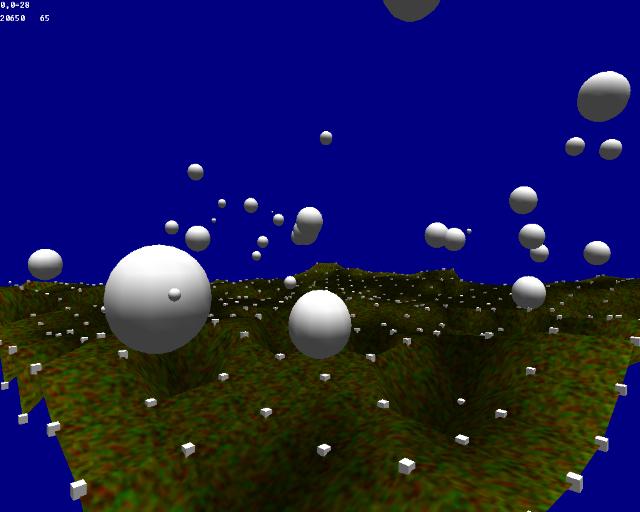
Here's a sample piece of code I've just finished writing.


Copy and paste it into DBP and let it run. Press space to drop the bombs and use the arrowkeys to move around. Optionally, you can use the mouse to click on the cubes and watch them fall.


As you'll see with the matrix, it can run quite smoothly when you hold the spacebar down. You'll get around 20000 polygons on screen and still maintain about 50 fps(depending on your machine). And for as many objects that are falling and rapidly deleting(which is very slow) this is very nice and a realistic appraoch for realtime gaming.

A lot more may also be done with the craters. Currently the craters are just made based on the object size. If you wanted, you could also check to see if the tiles around the craters exist and maybe decrease those by half or something to make a nice smooth crater. You could check the direction from which the blast came from, and effect the surrounding tiles in that way.

Hopefully this is what you're looking for. A mesh matrix could also be generateed, and you could really twist and turn the polygons using the new mesh manipulation commands(5.8 and after). I haven't really toyed with those enough to start giving advice, but don't consider those out. However, matrices are the way to go if you don't have high speed demands, and want a simple organized designed to create the illusion of a destructable terrain.

[Screenshot]


A book? I hate book. Book is stupid.
(Formerly Yellow)
Green Gandalf
VIP Member
21
Years of Service
User Offline
Joined: 3rd Jan 2005
Playing: Malevolence:Sword of Ahkranox, Skyrim, Civ6.
Posted: 18th Feb 2007 22:49
Nice.

And can obviously be extended to give more realistic craters.
fubarpk
Retired Moderator
21
Years of Service
User Offline
Joined: 11th Jan 2005
Playing: AGK is my friend
Posted: 19th Feb 2007 02:33
Great Mike that is an excellent piece of code now i wonder if sumone can direct me a good piece of code that will load a heightmap i know there are plenty on the forum lists on this but i cant seem to find one im happy with. I had a good one in an old piece of code from the forums quite sometime ago but silly me cant find the code.

Any help would be greatly appreciated

fubar
fubarpk
Retired Moderator
21
Years of Service
User Offline
Joined: 11th Jan 2005
Playing: AGK is my friend
Posted: 19th Feb 2007 02:34
In regards to the last post i mean load a heightmap into a matrix

fubar
Bighead92
19
Years of Service
User Offline
Joined: 27th Dec 2006
Location: Switzerland
Posted: 20th Feb 2007 12:12
Hi, everybody
I teied something like this.
It`s not a very good code but it works pretty well.

Login to post a reply

Server time is: 2026-06-10 02:56:53
Your offset time is: 2026-06-10 02:56:53
