Sorry your browser is not supported!

You are using an outdated browser that does not support modern web technologies, in order to use this site please update to a new browser.

Browsers supported include Chrome, FireFox, Safari, Opera, Internet Explorer 10+ or Microsoft Edge.

FPSC Classic Product Chat / V118 Public Beta 17

Author
Message
Kerrby
17
Years of Service
User Offline
Joined: 14th Mar 2008
Location: Australia mate.
Posted: 16th Apr 2011 13:40
Beta 14 fixed anti-grav platform yeah?


WizMod Developer.
Flatlander
FPSC Tool Maker
18
Years of Service
User Offline
Joined: 22nd Jan 2007
Location: The Flatlands
Posted: 16th Apr 2011 16:59
Quote: "Beta 14 fixed anti-grav platform yeah?"


Yep!

@ All

I will no longer be helping in this thread nor anywhere else in the forums for a time. I will be concentrating all my efforts to RPG Mod and my game.


Terry
Sparrowhawk
14
Years of Service
User Offline
Joined: 12th Apr 2011
Location: Planet Magrathea
Posted: 16th Apr 2011 18:07
I seem to be having issues with characters, Im running the version 13 beta, and if I add one character it fine, however if I add a second: - Array does not exist or array subscript out of bounds at line 19012
Well, it also says building entity arrow.x, which I assume is the start player Icon, however this issue only occurs with 2+ characters, so far. I have tested it with loads of characters, ww2, sci-fi etc, and it always happens.
the problem doesn't exist if there are no characters on the map. Anyone else had this issue?
I'm reluctant to re-install, it would be the 8th time this week, and I know my PC meets the requirements, however if its helpful I can give you those.
DennisW
17
Years of Service
User Offline
Joined: 15th Jun 2008
Location: Ohio
Posted: 16th Apr 2011 19:07
@Flatlander Sorry to here that I don't get in here much but when I do I like to read your insight. Take care

Dennis

Ham and Eggs Breakfast
The Chicken was involved the Pig was Committed
Payam
16
Years of Service
User Offline
Joined: 28th Mar 2009
Location:
Posted: 16th Apr 2011 19:12 Edited at: 16th Apr 2011 19:14
When I build a game and I set the postprocessing to 3 or 4 then I see this error.

Should I copy something by myself?

*Edit:
When the loading bar is about 70-90% complete this error comes and then the game close.

Does anyone else has this problem?
If yes please report in google code.

Have our guns was a mistake!!!

I am PaYaM
veer
15
Years of Service
User Offline
Joined: 3rd Mar 2010
Location:
Posted: 16th Apr 2011 20:04
@flatlander thank..you for your time
Dark Frager
15
Years of Service
User Offline
Joined: 16th Mar 2010
Location: The Void.
Posted: 16th Apr 2011 20:47
I've upgraded to beta 13 but when I test my game and get to [302] Creating entity instances this comes up. "Runtime Error 118. Object does not exist/ subscript out of bounds (or something like that) does not exist on line 19012.

Any help?
Thanks.

All alone in my room, haven't been outside since 1992.

Gibba gobba
16
Years of Service
User Offline
Joined: 21st Dec 2008
Location: regret
Posted: 16th Apr 2011 21:21
Holy crap! how many betas do we really need?

Hello one and all.......
veer
15
Years of Service
User Offline
Joined: 3rd Mar 2010
Location:
Posted: 16th Apr 2011 21:36
just one more
GreenDixy
17
Years of Service
User Offline
Joined: 24th Jul 2008
Location: Toronto
Posted: 16th Apr 2011 22:08
Quote: "Holy crap! how many betas do we really need?"


kinda glad there is beta's means work is getting done on it to make it more stable for us to use

======================================

GreenDixy Productions http://GreenDixy.Com
coolmart6
14
Years of Service
User Offline
Joined: 16th Apr 2011
Location:
Posted: 17th Apr 2011 00:30
Hello, i got a bug in the beta! the sci-fi and ww2 weapons doesn't have hands but have a texture of a hand on them, can anyone tell how to fix it?
Kerrby
17
Years of Service
User Offline
Joined: 14th Mar 2008
Location: Australia mate.
Posted: 17th Apr 2011 04:31
Quote: "Runtime Error 118. Object does not exist/ subscript out of bounds (or something like that) does not exist on line 19012.
"


Yeah I was getting something like that as well. Turns out it was cube.x which was my trigger point causing the crash.


WizMod Developer.
Payam
16
Years of Service
User Offline
Joined: 28th Mar 2009
Location:
Posted: 17th Apr 2011 11:58 Edited at: 17th Apr 2011 12:03
No answer to this:
Quote: "When I build a game and I set the postprocessing to 3 or 4 then I see this error.

"

After the build complete and I run the game and press Start in the menu about when the loading is 80% complete this comes.

I have to say I could play the Lightraydemo with high quality but I can's play my little room for testing Lightrays.

Have our guns was a mistake!!!

I am PaYaM
Michael Thompson
16
Years of Service
User Offline
Joined: 15th Aug 2008
Location: Behind you (if not, in australia)
Posted: 17th Apr 2011 13:41 Edited at: 17th Apr 2011 13:46
Awesome!!! Downloading now!!!

http://www.flashstargamecreations.webs.com
Kerrby
17
Years of Service
User Offline
Joined: 14th Mar 2008
Location: Australia mate.
Posted: 17th Apr 2011 14:18
Getting
Quote: "Runtime Error 118. Object does not exist/ subscript out of bounds (or something like that) does not exist on line 19012"
again. At first it was cube.x which appears to be the trigger zone box. Now I'm getting the error with sci-fi window b (win_b.x).

I've re-installed FPSC about 3 times in the last two days because of various errors.

Does anyone know when BETA 14 is estimated to be?


WizMod Developer.
Dark Frager
15
Years of Service
User Offline
Joined: 16th Mar 2010
Location: The Void.
Posted: 17th Apr 2011 18:12
Thanks for the info Kerrby. Since you are getting the same error again, I'll halt my projects for now and wait until beta 14. The only reason I upgraded to B13 is I had this weird issue with entities glowing white while others didn't.

All alone in my room, haven't been outside since 1992.

Soviet176
15
Years of Service
User Offline
Joined: 19th Sep 2009
Location: Volgograd
Posted: 17th Apr 2011 18:21
@Have our guns

You need to copy over the lighrays folder from your FPSC install directoy "effect bank" over to your built games effect bank.


Payam
16
Years of Service
User Offline
Joined: 28th Mar 2009
Location:
Posted: 17th Apr 2011 19:24
Well I think it should fix to copy by itself if the game designer applied it in build setup.

This new option should be add.

Have our guns was a mistake!!!

I am PaYaM
Dark Frager
15
Years of Service
User Offline
Joined: 16th Mar 2010
Location: The Void.
Posted: 17th Apr 2011 19:48
Hmm, the issue that I and Kerrby are having now seems to be fixed for me. Weird.

All alone in my room, haven't been outside since 1992.

veer
15
Years of Service
User Offline
Joined: 3rd Mar 2010
Location:
Posted: 17th Apr 2011 21:11
run hard disk cleaner...all those previous temperory ...files in c drive give you error
Darth Potato
15
Years of Service
User Offline
Joined: 8th Aug 2009
Location: The Death Star
Posted: 18th Apr 2011 02:53 Edited at: 18th Apr 2011 02:54
Really? Iget the error after I use the Dark AI appear scripts (both the enemy and the ally ones). If I use one on one entity and the other on a different entity, I get the error. I tried building the level step by step, the error came up after beginning the build with the two appear scripts. If I use only one, then the error doesn't pop up. Maybe it has something to do with the team arrays in Dark AI?

P.S. [EDIT] My error is from an Array, but the same line.[/EDIT]

The Sith Empire will rule the galaxy.
Croeso
14
Years of Service
User Offline
Joined: 18th Apr 2011
Location: Corfe Mullen
Posted: 18th Apr 2011 17:08
Getting error report following installing FPS BETA 13. Removing BETA 13 and problem gone.
"Runtime Error 118. Object does not exist/ subscript out of bounds (or something like that) does not exist on line 19012"
thiconZ
14
Years of Service
User Offline
Joined: 18th Apr 2011
Location: 127.0.0.1
Posted: 19th Apr 2011 03:51
i just updated to beta 13 and i still have the invisible wall bug and now some of my ground and doors are turned pure black, i have it also set on high textures and set for performance,im not sure if im the only one getting this but just letting you know i still have the invisible wall bug and some black doors and ground.
Disturbing 13
20
Years of Service
User Offline
Joined: 12th Apr 2005
Location: Murder Capital of the World
Posted: 19th Apr 2011 16:09 Edited at: 19th Apr 2011 16:10
When testing in editor everything works fine.When I compile the level to a seperate game it compiles fine but when I play the seperate game it freezes at the load screen about 25% and gives me this error.


http://disturbing13projects.proboards.com/
Making Monsters do Horrible things!
Dark Frager
15
Years of Service
User Offline
Joined: 16th Mar 2010
Location: The Void.
Posted: 19th Apr 2011 16:10
@D13: Run the file as administrator.

All alone in my room, haven't been outside since 1992.

Calvin P
14
Years of Service
User Offline
Joined: 20th Feb 2011
Location: In your nightmares.
Posted: 20th Apr 2011 00:05
@ThiconZ
I'm having the same problem when the lightmapping is set to high quality as well as performance.

I am using an nVidia 9800 GT, if it's of relevance.
thiconZ
14
Years of Service
User Offline
Joined: 18th Apr 2011
Location: 127.0.0.1
Posted: 20th Apr 2011 03:12
Quote: "I'm having the same problem when the lightmapping is set to high quality as well as performance.

I am using an nVidia 9800 GT, if it's of relevance."


i guess their patch didn't work out how they wanted it too, maybe we just got to stick with medium until they get it working for everyone?

i don't really mind medium settings that much but i think when its set to high it looks pretty good, also are you having the issue with black walls, doors and, floors?
spudnick
14
Years of Service
User Offline
Joined: 30th Nov 2010
Location:
Posted: 20th Apr 2011 03:26 Edited at: 20th Apr 2011 03:35
error after upgrading from v18.10 to v18.13
i have tried on 3 differant saves, and all are getting same error
of 118 Array does not exist or arrays subscript out of bounds at line 19012.

and its always the same Line in my 3 differant games.Well after loads of changes i have narrowed down the problem.

And that is, its nothing to do with the Model pack 53 But to do with the actual FPS creator Version,

I can not have No more than One character either it is a stock WW2 soldier or a syfi one or even Errants TF341 soldiers.

So im stuffed untill the FPSC Team reads this and help us to fix problem.
All was ok in version v18.10
I have also updated from 18.10 to 18.13 on my other 2 computers and all do the same.
So it is defantly V18.13 BUG as all was working fine before.

i did post this in bug postv, but nearly a week later, no replys, so now here,
uzi idiot
Valued Member
15
Years of Service
User Offline
Joined: 27th Dec 2009
Location: Who Knows?
Posted: 20th Apr 2011 16:36
Is the scriptable Flak still in progress

Sparrowhawk
14
Years of Service
User Offline
Joined: 12th Apr 2011
Location: Planet Magrathea
Posted: 20th Apr 2011 21:59
Quote: "error after upgrading from v18.10 to v18.13
i have tried on 3 differant saves, and all are getting same error
of 118 Array does not exist or arrays subscript out of bounds at line 19012."

I get this error whenever I add more than one character entity, are there any in your saves?
spudnick
14
Years of Service
User Offline
Joined: 30th Nov 2010
Location:
Posted: 21st Apr 2011 01:53 Edited at: 21st Apr 2011 02:00
@SparrowHawk
All my saves has more than one character in them. and if i just leave one then all works ok.

so far i have removed characters, and i can now test the levels for glichyness and watt not!

i just wish i new where to get the fps creator files for game engine and i would have a go at editing them myself.
its goto be somthing to do with the ivisable problem that has been fixed.

So i wonder how many people out their has upgraded and now basicly can make any games,

Im know Beta's have a few little bugs in them But crimey This has goto be the biggest bug i have ever come across in any software,
i know the develoment team are hard at work, but please try the basics first before publishing.

so now after a week of no word or anything, i have decided to buy another game engine to make games
LeeBamber
TGC Lead Developer
25
Years of Service
User Offline
Joined: 21st Jan 2000
Location: England
Posted: 21st Apr 2011 01:58
BETA14 uploaded. Does this one solve the line 19012 crash bug?

I drink tea, and in my spare time I write software.
Sparrowhawk
14
Years of Service
User Offline
Joined: 12th Apr 2011
Location: Planet Magrathea
Posted: 21st Apr 2011 02:16
Quote: "Does this one solve the line 19012 crash bug?"

Sorry, im not sure, as the bug seems to have randomly disappeared before the beta 14 update, will get back to you about it if it comes back.
Maybe i just needed to run CCleaner and FPSC Cleaner.
Nazareth Entertainment
14
Years of Service
User Offline
Joined: 8th Dec 2010
Location: Under the desk
Posted: 21st Apr 2011 02:40
its fine at the moment, when i installed 13 it cropped up streight away so looks okay so far

Deathkon 3000 is no longer in production..... and no their was no "curse" its just the fact i couldnt be botherd!
KeithC
Senior Moderator
19
Years of Service
User Offline
Joined: 27th Oct 2005
Location: Michigan
Posted: 21st Apr 2011 02:56
It fixed the line issue; but all new kinds of oddities popped up.

-Keith

Anigma
14
Years of Service
User Offline
Joined: 25th Mar 2011
Location:
Posted: 21st Apr 2011 08:46
Quote: "It fixed the line issue; but all new kinds of oddities popped up"


Aw man... I was hoping we had a release candidate in 14. Terry thought it was pretty solid.

I might give this one a try though and see what happens. Still running v12 for now.
Matt Rock
20
Years of Service
User Offline
Joined: 5th Mar 2005
Location: Binghamton NY USA
Posted: 21st Apr 2011 21:56
The entity issue seems to have been solved, but now I'm getting a problem with the antigrav platform. I'm not sure if this problem has existed since some earlier patch, or if I'm just an idiot in setting it up, lol. But I made a quick little map to play around with sending the antigrav platform on a horizontal path, and dropped some Hazmat character entities in to test the 19012 problem. Here's the layout:
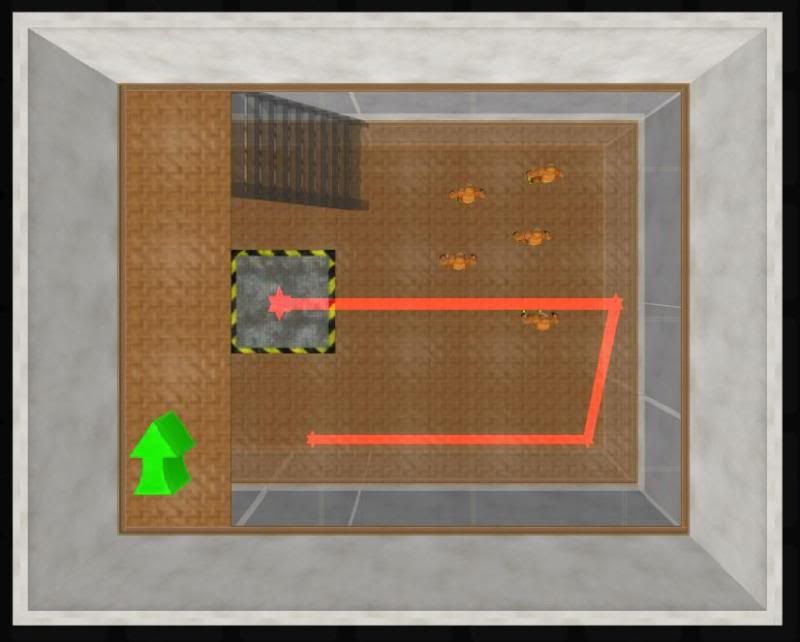


The first time I tested the map, I jumped on the lift and nothing happened; it was solid, but it didn't move. I dropped the hazmat guys in after that, and on the second attempt to test the level, I just passed straight through the antigrav platform, as if it didn't have collision or anything. Here's how it's set up:
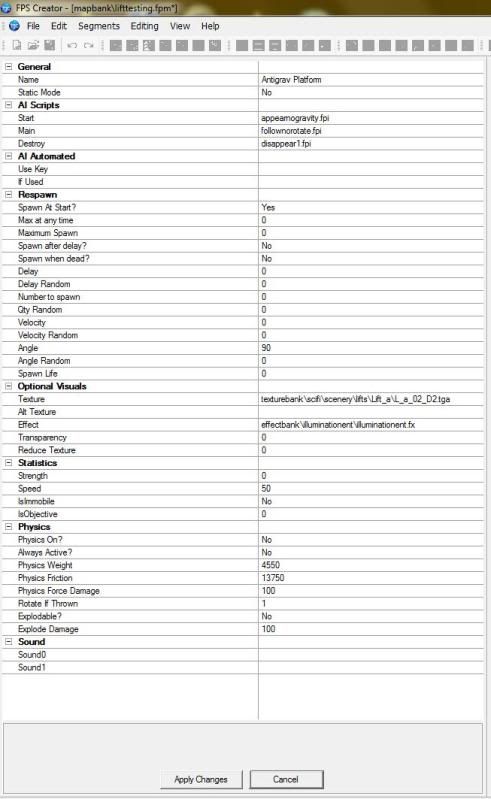


I literally didn't change anything; I dropped some wall segments, put some waypoints down, and dropped the antigrav lift entity, without changing anything. Not sure why it isn't working, or if it's related to beta 14. Figured I'd mention it regardless though!

In an interstellar burst, I'm back to save the universe

spudnick
14
Years of Service
User Offline
Joined: 30th Nov 2010
Location:
Posted: 22nd Apr 2011 02:18
Well the bug of 118 Array does not exist or arrays subscript out of bounds at line 19012
Has now been fixed for me. i have tried with 3 characters and all is ok. now i can go and add my 40 ish to my game.

Thanks team for Fix, even tho i do moan a bit, but its just im hooked on this software
Arseny
14
Years of Service
User Offline
Joined: 16th Aug 2010
Location: Russia
Posted: 22nd Apr 2011 15:24
After beta 14, in all of my custom weapons(well, eai-rigs) the firespot is always closes the view of the gun, even I assign to alignz= a very big value. How I can fix it?
Sparrowhawk
14
Years of Service
User Offline
Joined: 12th Apr 2011
Location: Planet Magrathea
Posted: 22nd Apr 2011 17:50
There seems to be a problem with loading and building levels. Levels which didn't previously exceed the memory cap do now. BTW when will the Mem Cap be raised? Because its stopping any game I make with light-maps. Unless i reduce the quality to 8
uman
Retired Moderator
20
Years of Service
User Offline
Joined: 22nd Oct 2004
Location: UK
Posted: 22nd Apr 2011 18:01 Edited at: 23rd Apr 2011 01:07
Beta 14.

I keep getting the FPSC Map Editor hanging while working away and have to force exit and shut down both FPSC.exe and the Map Editor .exe windows via Task Manager. About an hour or so work is all I get until is falls over again. Seems like it is hogging all resources or simply refuses to respond for some other reason. There also seems to be something not quite right with the way it handles segments and not updating things in relation to them. Nothing much I can put my finger on. No error messages as I turned off the memory cap to see if that would fix the issue. It does not. On or off it makes no difference. Level I am working on is only just over 500mb so should not be near any limit, however it seems that the FPSC memory management is a mess and it does not release any back to the system memory but keeps using it up additionally - the longer you work away the more it eats away at system resources until theres none left and eventually hangs.

Never had this problem before or any other major issue until the last few releases where various things have crept in. At the moment its not happy and is agressive on the cpu which is always a sign that somethings not right. I have seen a number of minor other indicators while working that its somewhat unstable but no real idea why. Things like not updating build settings. Occasional glitches in the Libraries again and so on.

I will try and isoplate something more.

Edit Udate : When FPSC fails and stops responding on checkng system resources Task Manager shows no issue with resources. CPU usage is shown as minimal at 1 - 5 %.

I am getting video card overheating problems whilst using FPSC so may well be an issue related to that. I dont get a problem with any other software in relation to overeating and its restricted to FPSC which is obvously somehwat demanding I presume on the video card.

I no one else has a similar issue may well be just my problem alone.


250 seamless textures : http://www.umedia.co.uk
Thraxas
Retired Moderator
19
Years of Service
User Offline
Joined: 8th Feb 2006
Location: The Avenging Axe, Turai
Posted: 23rd Apr 2011 08:01
Quote: "BTW when will the Mem Cap be raised?"


It can't be raised. AFAIK it's to accommodate 32bit operating systems which can only register a certain amount of memory. I'm sure someone who actually understands these things could explain it much better than I just did.

A man will one day wear a tophat in glasgow on a sunny day juggeling grapes while humming the jurrasic park theme tune.
raymondlee306
15
Years of Service
User Offline
Joined: 24th Oct 2009
Location: Ohio
Posted: 23rd Apr 2011 11:03 Edited at: 23rd Apr 2011 11:05
I'm pretty sure that's right Thraxas. A few pages back here there is a link to a program that will allow you to raise the cap. You also have to edit your memorycap=0. There is also a "switch" that will force windows XP to run in only 1 gig instead of what it normally requires, but it is very very unstable. Like Thraxas said this is not a program specific limitation. Kind of like a Quad core. I have a quad core at work and run autodesk inventor. But Inventor will only react with 1 core while doing normal process. The only thing it uses all 4 cores is to render. So sometimes it doesn't matter how much you have it is how EVERYTHING you have works together. If your having a really hard time with the cap try thinking of some of your favorite games from only 3-5 years ago. They would more than likely been made in less than 1.85 gig memory because 32 bit would have been prevalent at the time. How did they overcome it?
Sparrowhawk
14
Years of Service
User Offline
Joined: 12th Apr 2011
Location: Planet Magrathea
Posted: 23rd Apr 2011 14:24
Ah, I see. I guess I will just have to delete some entities then.
Sparrowhawk
14
Years of Service
User Offline
Joined: 12th Apr 2011
Location: Planet Magrathea
Posted: 23rd Apr 2011 14:49
Ok, now I have another error, (not on the too large map) whereby when the program gets to initialising physics it crashes. Also built games get stuck loading.
Not sure what's wrong with it.
Arseny
14
Years of Service
User Offline
Joined: 16th Aug 2010
Location: Russia
Posted: 23rd Apr 2011 17:39
So, no chance for fixing the muzzleflash glich?
raymondlee306
15
Years of Service
User Offline
Joined: 24th Oct 2009
Location: Ohio
Posted: 23rd Apr 2011 19:52 Edited at: 23rd Apr 2011 19:53
@ Sparrowhawk, This physics thing sounds like you just might need a reinstall. About deleting entities...That could work. Or as an alternative, how are your portals set up for culling? What are your texture resolutions? If you have a modeling software can you go in and just delete faces the player will never see? Try using billboards for object far away instead of 3D entity the player will never get close enough to know the difference. This could help your memory issue and also possibly increase frames per second.
Sparrowhawk
14
Years of Service
User Offline
Joined: 12th Apr 2011
Location: Planet Magrathea
Posted: 23rd Apr 2011 21:53
Quote: "This physics thing sounds like you just might need a reinstall"

Oh dear, the 12th Re-install this month...I'm beginning to think the game engine hates me...
Will work through the list of things you mentioned, if a re-install doesn't fix it, will try later in the week, too many hours! Great software, but maybe I just expect too much!
raymondlee306
15
Years of Service
User Offline
Joined: 24th Oct 2009
Location: Ohio
Posted: 24th Apr 2011 00:29 Edited at: 24th Apr 2011 00:30
Quote: "Oh dear, the 12th Re-install this month...I'm beginning to think the game engine hates me..."


It's not you buddy. Remember the versions in this thread are "BETA". It is not the final version. There WILL be bugs. If you would like to keep working on a game on a more stable platform use the official version of 1.17. Then when 1.18 is released you can add the new features into your game.
Sparrowhawk
14
Years of Service
User Offline
Joined: 12th Apr 2011
Location: Planet Magrathea
Posted: 24th Apr 2011 11:32
I think I will just wait a while, Ver 1.17 didn't even run properly...
But as this is going as bit off topic, and not helping anyone else, I will stick to bug reports.

Login to post a reply

Server time is: 2025-08-08 20:59:21
Your offset time is: 2025-08-08 20:59:21